
Accounts Payable Automation
Automate your entire AP workflow — from invoice to payment.
Payments on terms
Predictable cash
Invoices clear approval in time to pay on the terms negotiated rather than late by default.
Duplicates caught
Fewer overpayments
The same invoice arriving twice is detected before a second payment leaves.
Close without a scramble
Faster period close
Accruals and open items are current because processing did not accumulate into a month-end backlog.
One governed workflow across systems that never talked.
- Who it's for
- Finance teams running the full payables cycle — from invoice receipt through payment — across an ERP, banking, and approval chains.
- What it does
- An end-to-end payables workflow covering capture, matching, approval, payment scheduling, and reconciliation.
- Systems involved
- Your ERP, banking, and supplier channels — connected through the REST Client, with dedicated activities built on request.
- How it stays governed
- Segregation of duties in permission scopes, payment approval in decision tables, and a full record per payment run.
What this looks like today
The friction that makes this workflow expensive to run by hand.
Backlog
Processing accumulates toward close
Invoices queue until month-end, turning the close into a scramble and making accruals a matter of estimation.
Leakage
Duplicates and late fees
The same invoice paid twice, or paid late enough to lose a discount, are quiet losses nobody is assigned to prevent.
Control
Segregation of duties is manual
Keeping approval and payment separate depends on process discipline rather than on the system enforcing it.
The workflow
How Koodisi runs it
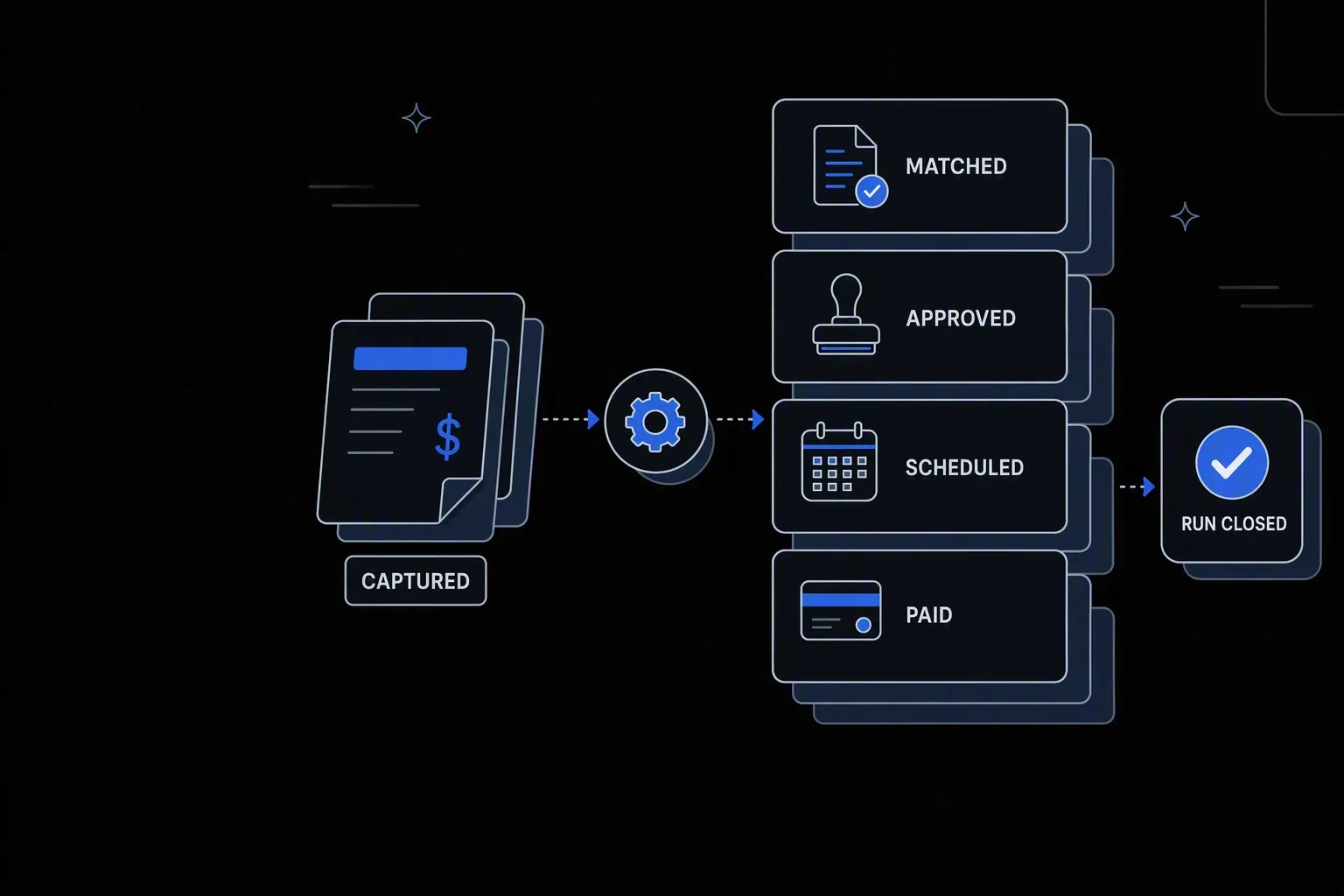
Koodisi automates accounts payable end-to-end — invoice capture, 3-way matching, approval routing, ERP posting, and payment scheduling — cutting AP team workload significantly.
Take in every payable
Invoices, expenses, and recurring charges enter one process regardless of how they arrive, so nothing sits in a personal inbox.
Scheduled and webhook triggers; retrieval over SFTP or the REST Client.
Validate and check for duplicates
Supplier, invoice number, amount, and date are checked against existing records, so a repeat submission is caught before it becomes a second payment.
Matching rules defined in decision tables.
Route approval within authority
Delegation of authority resolves who must approve by amount, category, and cost centre, and the workflow waits for their decision.
Thresholds live where finance can review and change them.
Schedule payment against terms
Approved invoices are scheduled to pay on the negotiated terms, capturing early-payment discounts rather than defaulting to late.
Payment timing rules evaluated per supplier.
Execute and confirm
Payment instructions are issued and confirmed against the ERP and bank, so an unconfirmed payment is never treated as settled.
Retry policies for transient failures; confirmed results logged.
Reconcile and record
Payments are matched back to invoices and bank records, leaving each run reconciled rather than reconciled later by hand.
Execution logging with per-record status.
Connectivity
The systems in this workflow
Koodisi orchestrates the platforms this workflow touches — through the REST Client today, and through a dedicated activity whenever you need one.





The capability underneath
Every workflow above is assembled from the same governed building blocks — which is why connecting one more system is a day of work, not a project.
Connect to anything
- REST and webhook connectivity with managed authentication (4 activities)
- Secure file transfer over SFTP (5 activities)
- Direct database reads and writes (4 activities)
Move and reshape data
- Translate between CSV, JSON, XML, and fixed-width formats (6 activities)
- Field-level mapping between systems that model data differently
- High-volume batch processing with per-record tracking (7 activities)
Decide and protect
- Decision tables for approval and routing rules your team can read
- Encryption, hashing, and signature verification on sensitive fields
- Retry policies, error handling, and full execution logging
Business systems connect through Koodisi’s REST Client, and our team builds dedicated activities for the ones you depend on — typically within a day of you asking.
Request a system →Governance
Automated, but still under control
Every run is authorised, recorded, and observable — the part that decides whether automation survives an audit.
Segregation of duties enforced
Permission scopes keep approving an invoice and releasing a payment as separate rights, so the control is structural rather than procedural.
Payment authority in a table
Approval thresholds and payment rules live where finance can review them and auditors can read them.
Every payment traceable
Invoice, match, approvals, payment instruction, and reconciliation are held together with before and after state.
Bank details masked
Supplier bank details are masked in logs, so operational records are not a target for payment fraud.
Credentials in Key Vault
ERP and banking credentials are stored in Key Vault and referenced at run time, never held in a step.
Traced through the run
Traces show where a payment run stalled while there is still time to act on it.
Approving an invoice and releasing a payment are separate permission scopes. One person holding both is a configuration you can see and prevent, rather than a process convention you hope holds.
Supplier, invoice number, amount, and date are matched against existing records at intake. Suspected duplicates are held for review rather than blocked outright, since legitimate repeats do occur.
Yes. Payment timing is evaluated per supplier against negotiated terms, so discounts are taken where the approval cleared in time — which is usually the constraint, not the payment itself.
Banking platforms connect through Koodisi's REST Client or secure file transfer, depending on what your bank supports. Where you depend on a specific integration, our team builds a dedicated activity — typically within a day.
Tools used in this workflow
Ship integrations faster. Operate them without chaos.
Less time on auth, retries, and deployment scripts. More time on the integrations your customers are asking for.
Contact Sales