The nightly SFTP pull looks fine in your scheduler logs. Files landed. Exit code zero. Nobody raises a flag. Three days later, finance notices the revenue numbers in the data warehouse are off by a week of transactions — because the upstream ERP dropped a column in the CSV export four days ago, the file still transferred successfully, and your pipeline ingested four days of rows where the amount field was null.
No alert. No retry. No failure. Silent, successful garbage.
This is the real file transfer problem, and it's a narrower version of the broader challenge of integrating legacy systems with modern platforms. Not which protocol you use. Not cron versus a workflow scheduler. The hard part is what happens between "file arrived" and "downstream system is correct" — and almost every automated file transfer setup handles it badly, because it was built as a transport job and never rebuilt as an integration pipeline.
The transport/integration confusion costs you twice
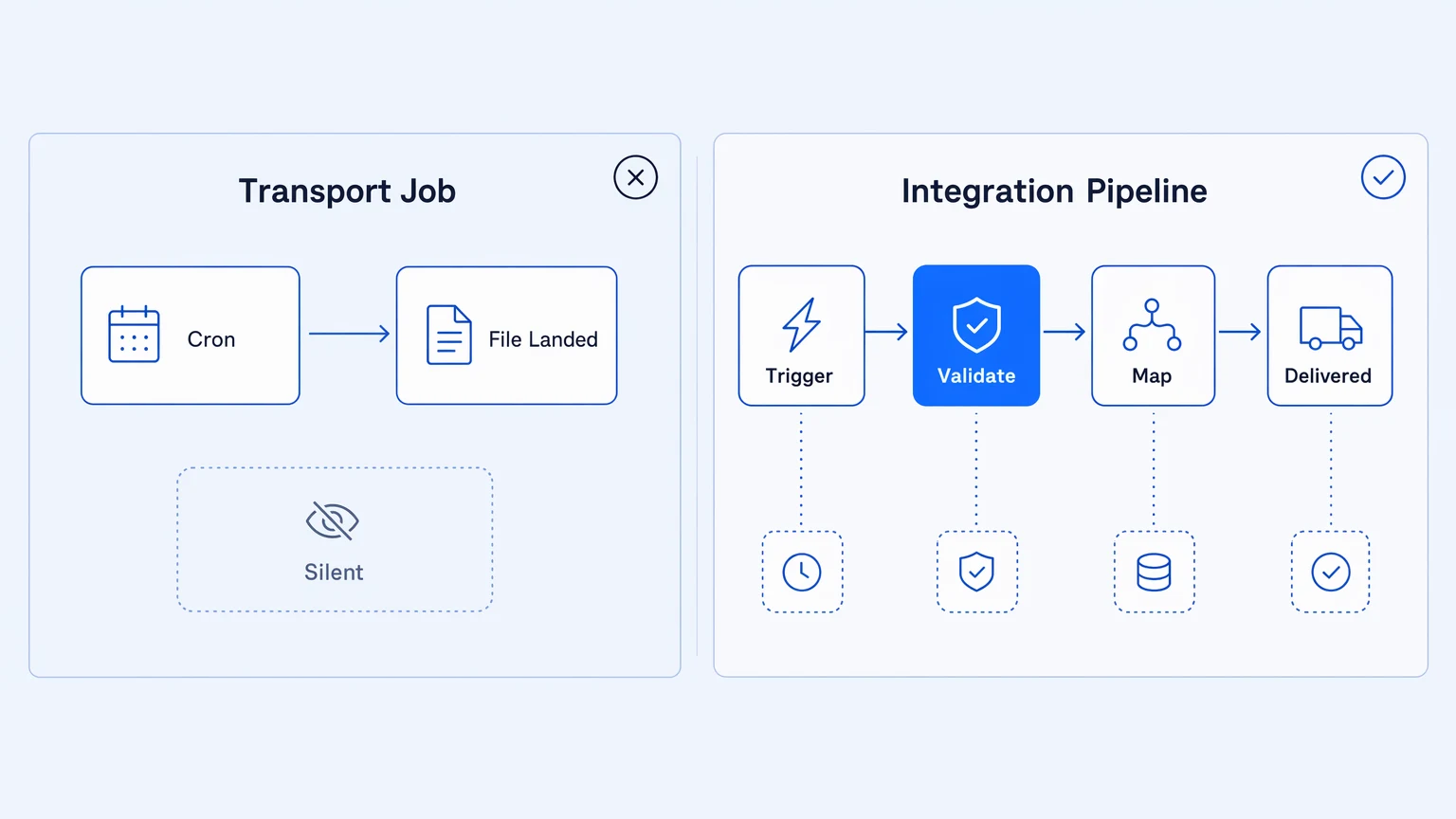
Most automated file transfer setups start as transport: get the file from here to there on a schedule. A cron job pulls from an SFTP endpoint every night. An S3 event trigger fires a Lambda. A script polls and writes to a shared drive. It works, and then it keeps working for months, which convinces everyone that it works.
The first cost arrives when something changes upstream. The vendor adds a field. A partner switches from fixed-width to delimited format. The source system starts sending UTF-16. The transport layer doesn't care — the file still lands — so the error surfaces downstream, hours or days later, through data integrity complaints rather than through an alert you own.
File transfer that ships to production without schema validation is a deferred data integrity incident.
The second cost shows up when you need to diagnose anything. A transport job knows when it ran and whether it exited cleanly. That's it. It doesn't know which rows were processed, whether any transformation step dropped records, what the file's shape was when it arrived, or whether the downstream system confirmed receipt. Debugging means reconstructing from whatever partial logs you have — which is exactly the log-spelunking step that makes integration failures so expensive to resolve.
The two costs compound. You can't validate what you can't inspect, and you can't fix what you can't validate.
What a file transfer pipeline actually needs
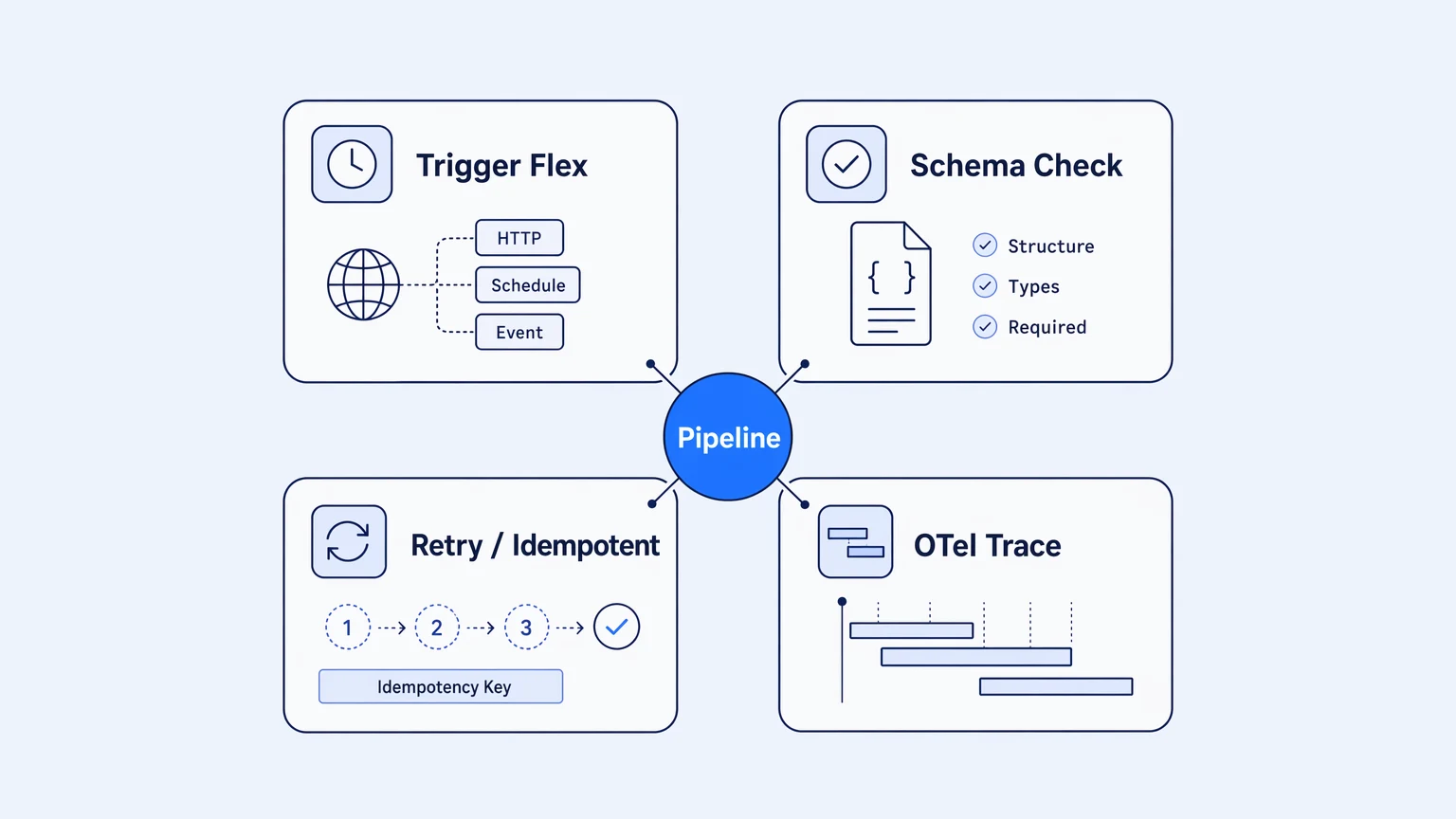
The upgrade path from transport job to integration pipeline has four concrete properties. Miss one and you're back in the same position.
Trigger flexibility. Cron is the wrong primitive for most file transfer workflows. Cron fires whether the file is there or not. A well-built pipeline triggers on file arrival — an S3 event, a webhook from the sending system, a poll-with-change-detection — so the downstream logic only runs when there's something to process. This eliminates a whole class of "job ran but nothing happened" ambiguity. Where cron is the right answer (a truly time-driven transfer, a report that always arrives at 6am), it should be combined with a presence check that fails loudly when the file is missing rather than silently succeeding with nothing to ingest.
Schema validation before processing. The file needs to be inspected against a known contract before anything downstream touches it. Not just presence-checked — actually validated: field names, types, expected ranges, required values. This step should fail hard and fast, with enough context to tell you which row broke and why, before any record reaches a destination system. JSON Schema, Avro, and OpenAPI work well here; the specific format matters less than the discipline of having one and running it on every file before processing begins.
Retry and idempotency by design. File transfers fail. SFTP connections drop. S3 uploads time out. Rate limits bite. A production pipeline handles this without manual intervention: retries with backoff for transient errors, idempotency keys so a file that arrives twice doesn't write twice, dead-letter handling so failed transfers have somewhere to land besides silence. These are not edge cases to be addressed "if needed." They are the minimum viable design for a system that runs unattended.
Observable execution, not just exit codes. Every step should emit a trace: file received at T, validated at T+2s, transformation applied, N rows written to destination, confirmation received. That trace needs to be searchable, attributable, and retained long enough to reconstruct what happened three days ago when finance noticed the discrepancy. OpenTelemetry is the right wire format — not because it's fashionable, but because it routes to whatever observability stack your team already runs, rather than locking the data inside a vendor's log viewer.
Where most integration platforms fall short
The standard approach is to bolt a managed file transfer tool onto an integration platform, or run an MFT product standalone. The problem: MFT products are good at transport and thin on integration. They give you protocol support, scheduling, and encryption in transit. They do not give you schema validation, transformation logic, downstream signaling, or distributed traces tied to your production observability.
Teams end up with two systems: a tool that moves the file, and a separate layer that processes it, with a handoff between them that is itself an unobserved gap. The failure mode lives in that handoff.
The file transfer is often the smallest part of the problem. The hard part is the twenty seconds after the file lands — and most tooling doesn't treat that as the job.
A platform that covers both sides of the handoff treats file connectors (SFTP, FTPS, FTP, S3, Azure Blob, GCS, SharePoint) and the processing pipeline as a single observable unit. The trace doesn't stop when the file lands. It continues through validation, transformation, routing, and downstream confirmation — so when something fails, you have the full execution picture, not a clean log from the transfer job and a void in everything after it.
The other failure mode is metered pricing. File transfer pipelines have variable traffic by nature: quarter-end batches, payroll cycles, vendor drops that spike unpredictably. Platforms that charge per execution or per task punish exactly this pattern — your bill climbs when your business is busy, and every retry on a failed transfer gets billed again. Feature-tiered pricing removes that structural misalignment. The pipeline retries as needed; the bill doesn't move with the traffic.
How to wire it up
- Pick the highest-risk transfer first — the one whose failure would be noticed latest and cost the most.
- Map what should happen at each step before building anything: how the file arrives, what validates it, where it lands.
- Build the pipeline so each step has a distinct, named outcome — success, validation failure, transport failure — not just pass/fail.
- Instrument every step with a trace that includes the file identifier, so a failure is diagnosable without re-reading logs.
- Once the first pipeline is observable and production-hardened, apply the same pattern to the rest — one hardened pattern, not N bespoke cron jobs.
Start with your highest-risk file transfer: the one whose failure would be noticed latest and cost the most to reconstruct. For most teams that's the nightly batch from a financial system, an HR data sync, or an EDI feed from a supplier.
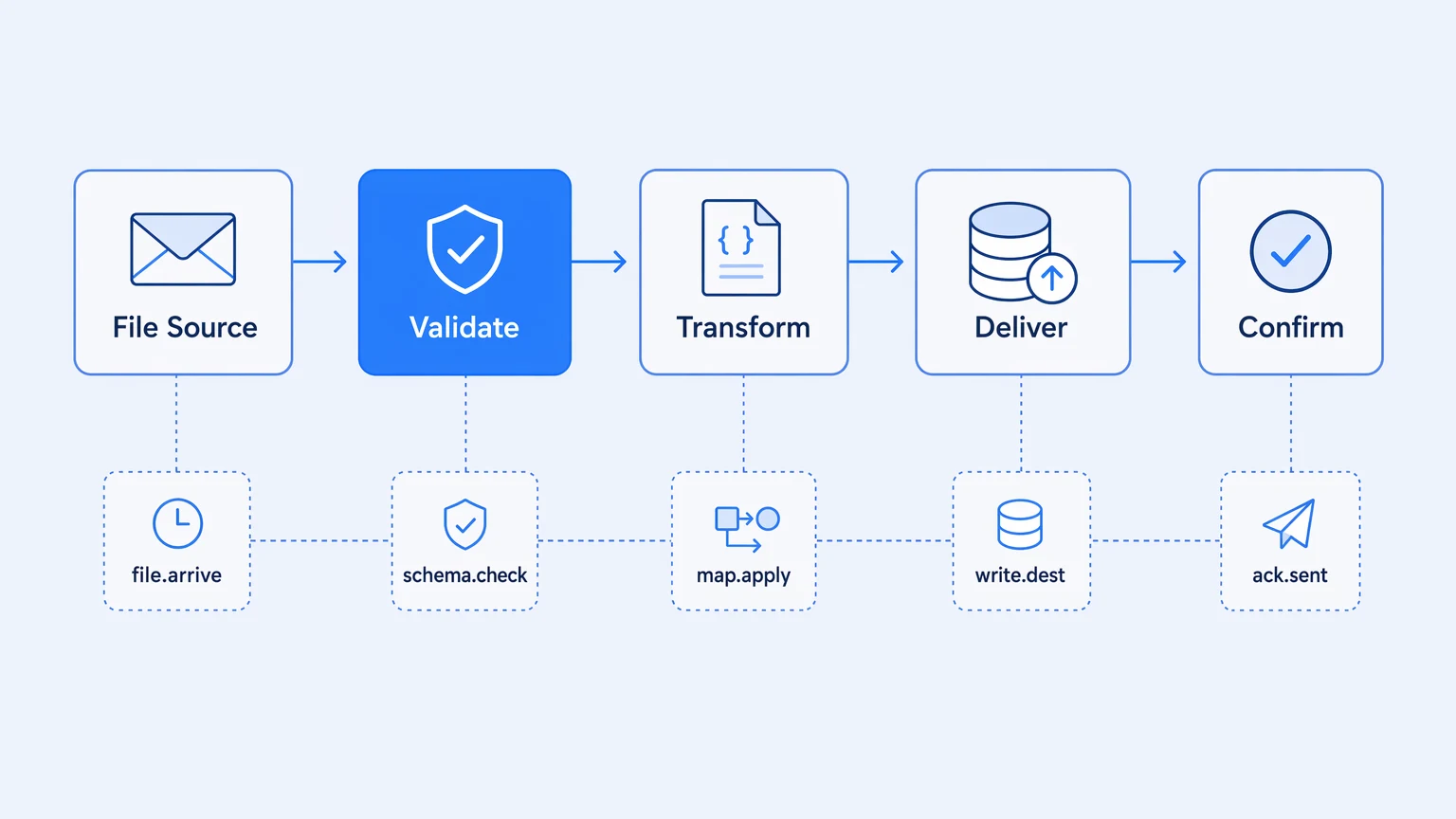
Map what should happen at each step before you build anything. File arrives — how? What event fires? It gets validated against a contract — which schema? What's the failure path? A transformation runs — what mapping, what output shape? Records hit the destination. A confirmation goes back to the source or gets logged. At each step, answer one question: what does failure look like, and who finds out?
Build the pipeline so each step has a distinct outcome — success, validation failure, transformation error, destination unavailable — and each outcome routes to a named handler. A validation failure should quarantine the file, emit an alert, and leave the payload available for inspection and replay, not silently drop it. A destination-unavailable case should retry with backoff and surface to an on-call channel.
Then instrument it. Every step should emit a trace that includes the file identifier, the step name, the outcome, and enough payload context to reconstruct the failure without re-running it.
Once the high-risk pipeline is observable and production-hardened, the pattern applies to every other file transfer in your stack. You are not building a custom solution each time; you are instantiating the same pipeline template with different endpoints, schemas, and routing. The effort is front-loaded.
The reusability is the point — one hardened pattern, not N bespoke cron jobs.
Koodisi ships SFTP, FTP, FTPS, S3, Azure Blob, GCS, Box, Dropbox, SharePoint, and OneDrive connectors alongside the full integration pattern library — including retry-with-backoff, dead-letter handoff, idempotent receiver, and splitter. OpenTelemetry traces run from file arrival through every downstream step on every tier, including Community. Pricing is feature-tiered, no per-execution billing, no overage invoices — so the pipeline can retry as needed without the bill reflecting it. The Professional tier at $399/month is where most engineering teams land; start with Community (1,000 executions/month, no credit card) to build and validate the first pipeline.
If you want the broader argument for why the integration layer needs to be treated as owned infrastructure rather than rented tooling, the full thesis is in why unobservable integration stacks are the real hidden bill.