Quarter close. Your controller sends the same Slack message she sends every quarter: "Payroll accruals still don't reconcile — someone needs to look at the cost center splits again." You pull up last month's export from the payroll system. You look at the journal entries in the general ledger. Three engineers spent an hour on this exact problem two quarters ago. The fix held for six weeks, then drifted when someone reorganized departments in the HRIS.
This is the standard experience of payroll-accounting integration — a narrower and thornier cousin of the broader HRMS integration work most HR teams eventually take on — and it has almost nothing to do with connecting the two systems. The connection is easy. You can get payroll data moving into an accounting system in a day. What takes quarters is the layer everyone treats as a detail: the mapping from payroll's data model to the chart of accounts, the cost center structure, and the general ledger's expectations about how debits and credits are organized.
The guides that explain how to integrate payroll with accounting systems spend 90% of their words on steps a vendor's native connector handles automatically, and approximately zero words on the part that fails.
The GL mapping problem is the integration problem
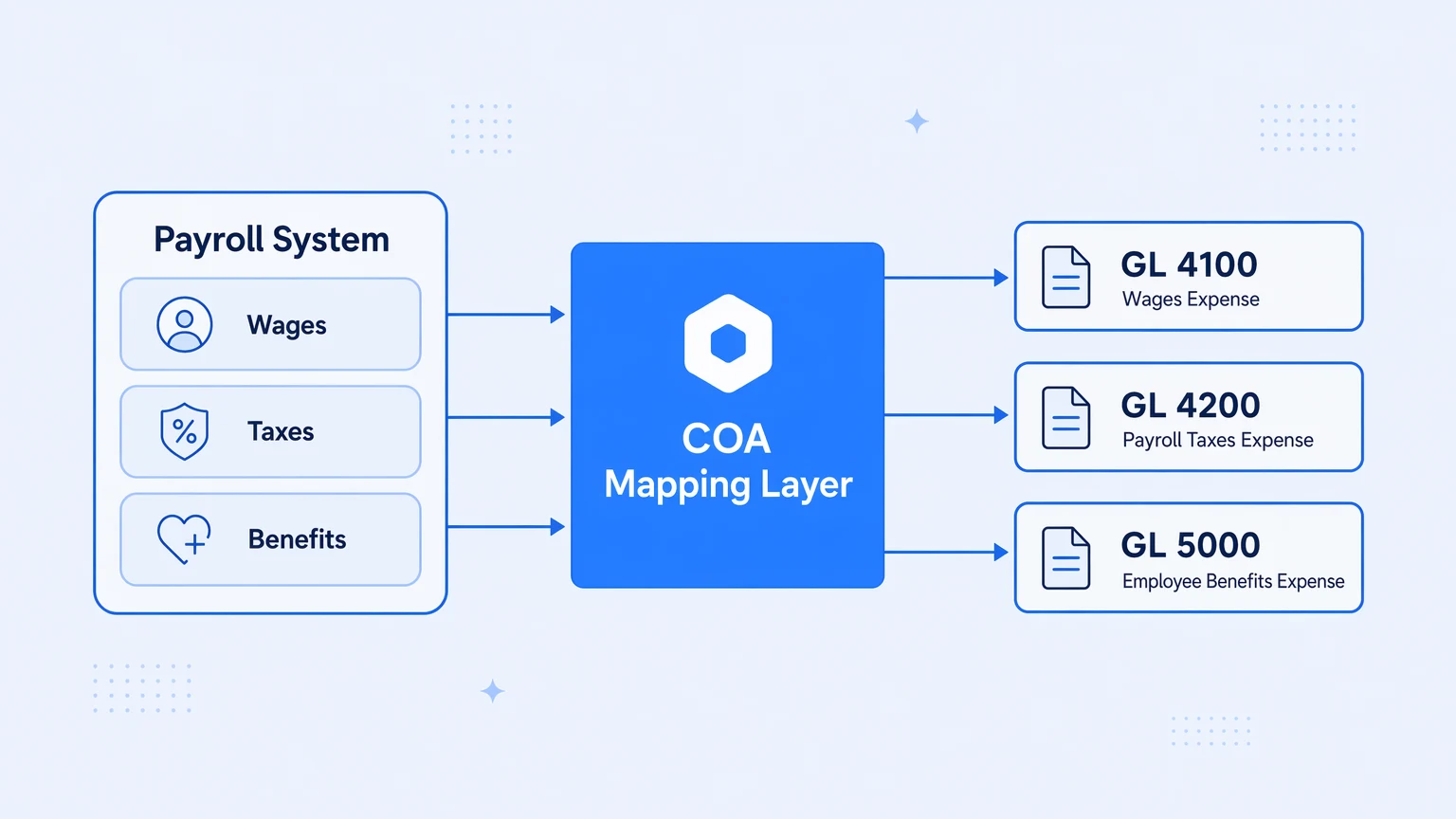
When payroll data needs to land in an accounting system, it doesn't just need to move — it needs to be translated. Payroll systems think in terms of employees, pay components, deductions, and tax codes. Accounting systems think in terms of accounts, cost centers, departments, entities, and journal entry types.
The translation between those two models is not a configuration screen you fill out once. It's a business rule set that encodes decisions your finance team made years ago, decisions that change whenever the org chart changes, whenever someone adds a new compensation structure, whenever you open a new legal entity, or whenever the chart of accounts gets reorganized during an ERP upgrade.
Four specific spots where it breaks:
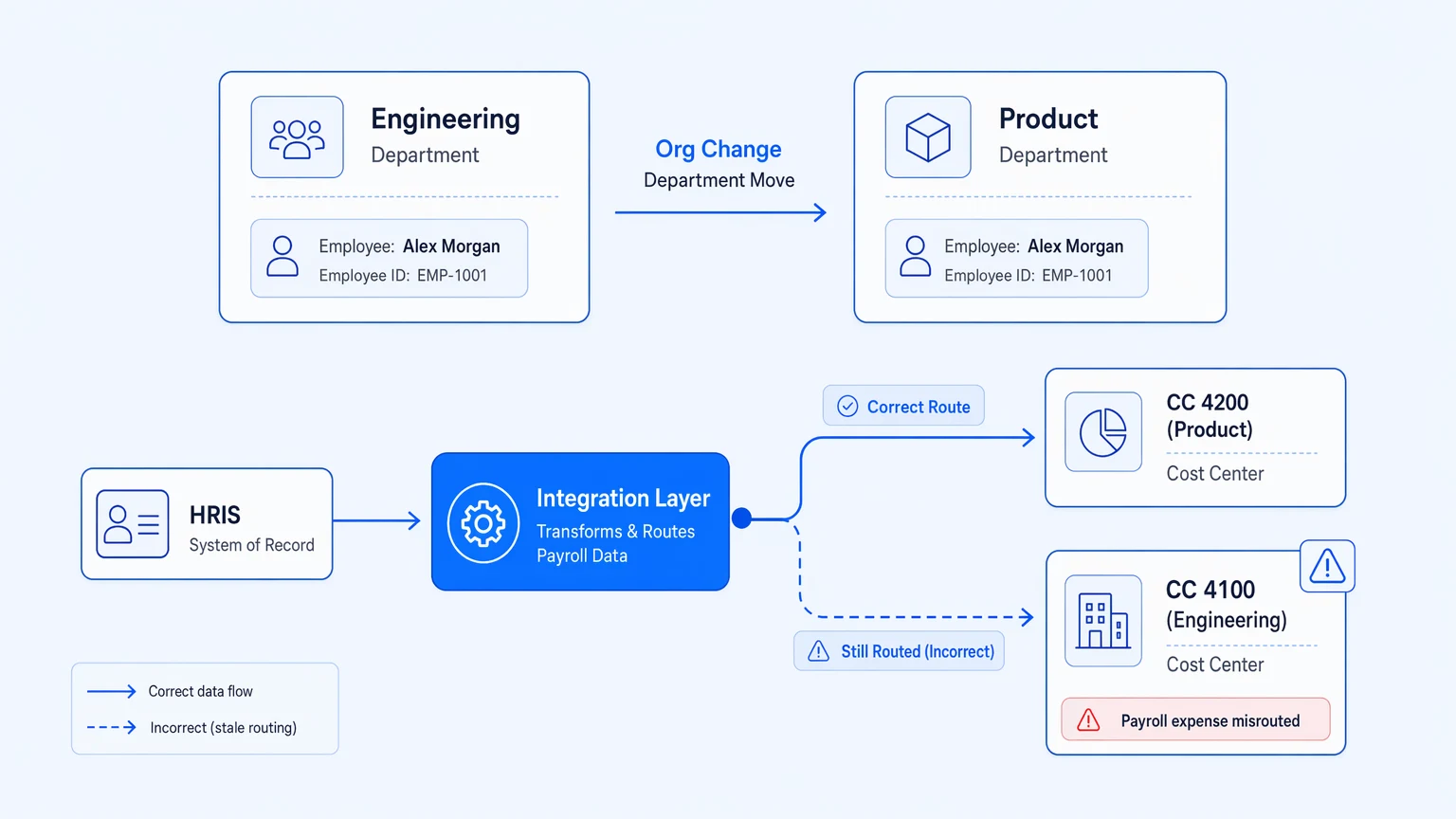
Cost center drift is the quietest. Employees move between departments. Department IDs in the HRIS don't always match cost center codes in the ERP. When someone moves from Engineering to Product and the integration layer wasn't told that HR's "Product" maps to GL cost center 4200 instead of 4100, every payroll run for that employee misallocates the expense until someone runs a variance report. Depending on close cadence, that's 30 to 90 days of misallocation before discovery.
Multi-entity splitting is where the hand-waving starts. If your payroll system runs payroll for multiple legal entities under one account, the journal entries need to land in the right entity's books with intercompany eliminations handled correctly. Payroll systems are entity-aware. Accounting systems are entity-aware. The integration layer between them often isn't — it pushes everything to one entity's GL and leaves intercompany sorting as a manual step.
Pay component decomposition is what the "connect your systems" guides skip entirely. A paycheck has a gross amount, but the GL doesn't want one line. It wants wages split from employer taxes, employer taxes split from benefits contributions, benefits contributions split by benefit type, and all of it organized by department and the debit/credit logic your accountants decided on. The payroll export gives you the components. The integration layer has to know which GL account each one maps to, and that mapping is a living document.
Accrual timing is the one that bites on month-end. Payroll runs on a cycle. The accounting period doesn't always align with it. When a payroll run straddles a month boundary — employees earn wages in June but the run processes in July — the accrual entry for June needs to land in June, and the reversal needs to land in July. Few payroll systems handle this natively. The integration layer has to.
The failure mode isn't "the data didn't transfer." It's "the data transferred into the wrong account for three months and nobody noticed until close."
Every vendor guide skips this because it's not a product feature — it's the business logic you have to build yourself.
Why "just use the native integration" doesn't stay true
Most accounting systems and payroll providers ship native integrations with each other's most popular counterparts. QuickBooks has a payroll sync. NetSuite has a payroll module. Your HR system probably advertises a connector to your ERP. For small, stable organizations, these work. For everyone else, the native integration is where the problem starts, not where it ends.
Native integrations are built around the happy path: one legal entity, one payroll provider, a chart of accounts that looks like the default template the accounting vendor ships. They handle data movement. They don't handle the business rules about where that data should land, because those rules are specific to your COA structure, your entity model, and your reporting requirements.
When you outgrow the native integration — a second entity, a payroll provider the native connector doesn't support, a COA reorganization — you have two options. Build a custom integration that encodes your mapping rules explicitly. Or maintain the native integration and layer manual journal entry corrections on top of it every month, which is what most teams actually do, and why the controller sends the same Slack message every quarter.
The custom integration is the right call. It requires building the mapping layer properly: the COA lookup table that translates payroll components to GL accounts, the entity routing logic, the cost center resolution, the accrual timing logic. A week of careful design, maybe. Real engineering work either way, and it needs to be treated like software: versioned, testable, deployable through environments, and observable when it produces wrong output.
Treating the payroll-to-GL mapping as a configuration detail rather than a software artifact is what causes the quarterly reconciliation failure.
What the integration actually needs to do
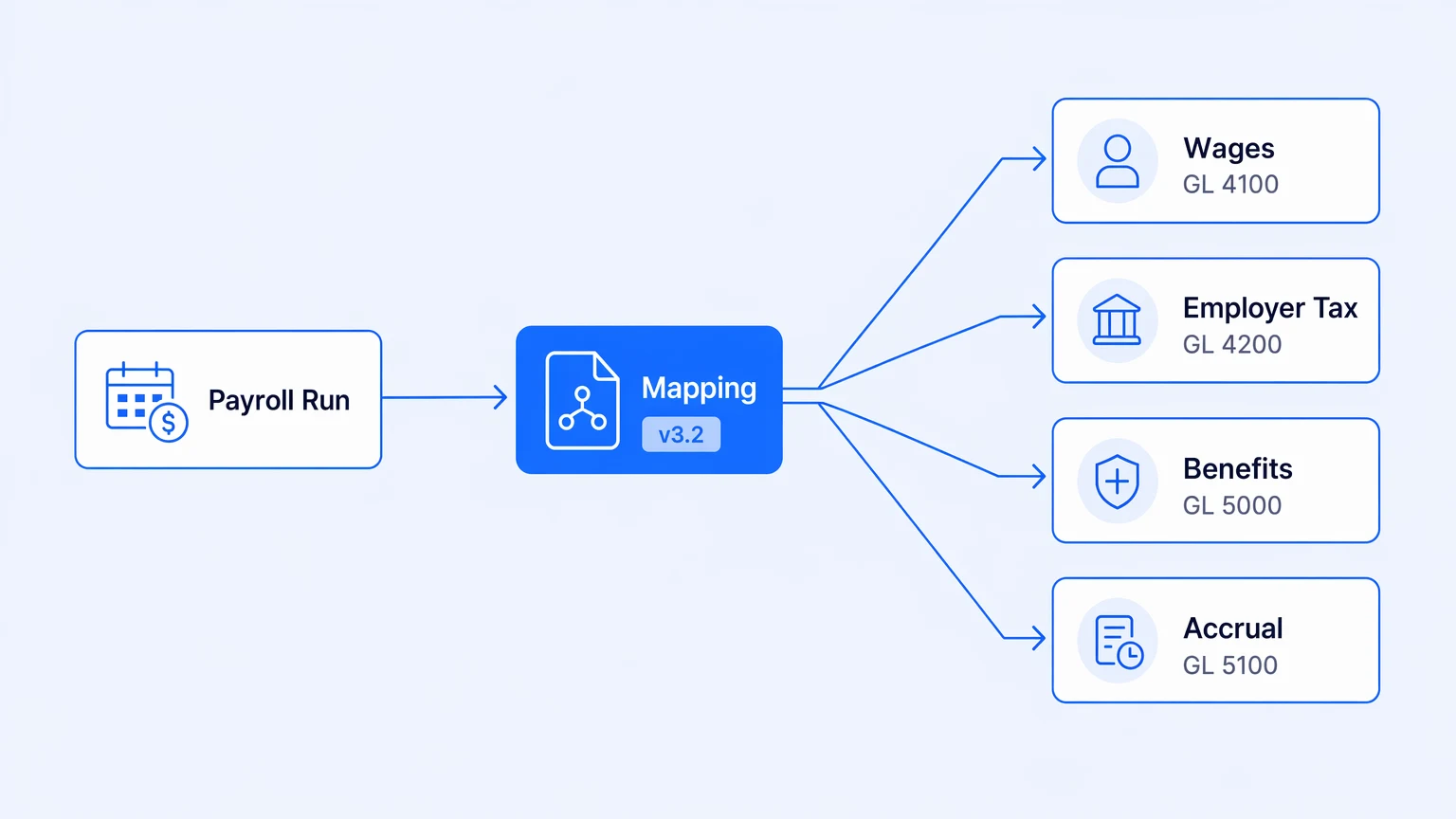
Five things, in roughly increasing order of difficulty.
First, pull payroll run data at the right time — on payroll confirmation, or on a schedule that respects accounting period boundaries.
Second, resolve employees to cost centers using a mapping that stays synchronized with the HRIS. Not a one-time lookup. It needs to resolve at the time of the payroll run, using whatever the org structure was on the effective date.
Third, decompose pay components into GL accounts using your chart of accounts mapping. Each compensation type, tax type, and benefit contribution maps to specific accounts. That mapping needs to be version-controlled so you can answer "what mapping was in effect for the May 28 run."
Fourth, route by entity for multi-entity organizations, and handle intercompany balancing entries when the payroll run spans entities.
Fifth, handle accruals when the payroll period straddles an accounting period boundary. Not an edge case — this is every semi-monthly payroll that doesn't land on the last business day of the month.
The first item is almost always solved by the native connector or a basic webhook. Items two through five are where the integration lives or dies, and they all require the same underlying discipline: the mapping rules that drive each of them need to be explicit, versionable, and auditable.
Explicit means the mapping isn't hidden inside a vendor's UI configuration screen that generates SQL you can't inspect. It's a data artifact — a lookup table, a schema, a decision table — that you can read, test, and modify without going through a vendor interface. Versionable means you can answer, for any payroll run that has ever happened, what version of the mapping rules was in effect. When the controller asks why Q1 cost center 4100 looks different from Q2, that answer should take three minutes. Auditable means that when you change the COA mapping — because finance reorganized accounts, because a new cost center was added, because a legal entity restructured — that change has a record: who made it, when, and what it replaced.
These are standard software engineering disciplines. They're unusual in integration tooling because integration tooling was built around connectivity, not around treating business logic as code.
The observability gap is the reconciliation gap
The reconciliation failures that land in your Slack channel during close are discovered late because there's no signal that the mapping produced wrong output. The integration ran. The journal entries landed. The GL balance looks correct — at the wrong granularity. You need a variance report to find the misallocation.
The missing piece is a trace for each payroll run's GL output. If the integration emitted a record — at the individual journal entry level — of what employee data went in and what GL lines came out, the variance surfaces immediately. You know, at the moment of each payroll run, whether the cost center resolution found a mapping for every employee. Whether any pay component landed in an "unknown" account because the COA mapping was missing a new compensation type. Whether entity routing handled a cross-entity employee correctly.
Those questions should take seconds, not a Friday afternoon reconstructing a timeline from four export files.
This is what observability at the integration layer actually buys you on a payroll reconciliation problem. Not a prettier dashboard — the ability to ask operational questions about specific runs, specific employees, specific mapping versions.
For teams building or rebuilding this integration, Koodisi ships OpenTelemetry on every tier, including the free Community tier, which means the trace from a payroll sync covers every activity in the flow and lands in the observability stack you're already running — not in a separate console you check after something goes wrong. The COA mapping lives as a versioned artifact in your repo. No per-execution billing, no overage invoices — the bill doesn't move when payroll run volume spikes at year-end. There's a fair-use ceiling, as on any real system, but no meter that ticks per journal entry processed.
The fuller argument for treating integrations as owned software rather than vendor-managed black boxes lives in the ownership pillar — the payroll-accounting sync is one of the cleaner illustrations of why that frame matters.
The honest tradeoff
If your payroll and accounting system are from the same vendor suite — a fully integrated HCM/ERP where payroll posts directly to the GL through the same underlying data model — most of what's described here doesn't apply. The mapping problem exists inside the vendor's product, and their implementation team handled it. The tradeoff is vendor lock-in and a narrower ability to customize cost center hierarchies or support non-standard compensation structures.
For everyone else — running payroll through a specialist provider and accounting through a separate system, or running multi-entity structures a single vendor doesn't cleanly support — the integration layer is real software that needs to be engineered, not a native sync you turn on and assume will work.
Start with the mapping, not the connection
Spend the first day auditing your chart of accounts mapping requirements before touching any API. List every pay component your payroll system produces. List the GL account each one should land in. List the cost centers in the accounting system and the HRIS attributes that should resolve to each one. List the entities and the routing logic.
That document is the specification for your integration. It will change, probably quarterly at first. Design the integration so that changes to it are deployable without re-engineering the whole pipeline — which means the mapping lives in a table or a schema, not in code.
When that's in place, run it against last quarter's payroll export in a staging environment. Compare the resulting journal entries against what actually posted to the GL. The delta is what the integration doesn't handle yet.
That sequence — specify the mapping, implement it as a testable artifact, validate against real data — takes longer than clicking "connect" in a native integration UI. It produces an integration that doesn't need a Slack message at every quarter close.