
The vendor's sales engineer is sharing their screen. The demo flow looks clean: a trigger fires, a record transforms, an API call lands, the result appears in the destination system inside four seconds. You nod. Everyone nods. The platform has 500 connectors, a visual flow builder, and an AI that suggests next steps. You book a second call.
Then you read the pricing FAQ. Then you look at the audit log configuration. Then you ask where traces go when a workflow fails in production. The demo was a car commercial. The question you forgot to ask was about the service contract.
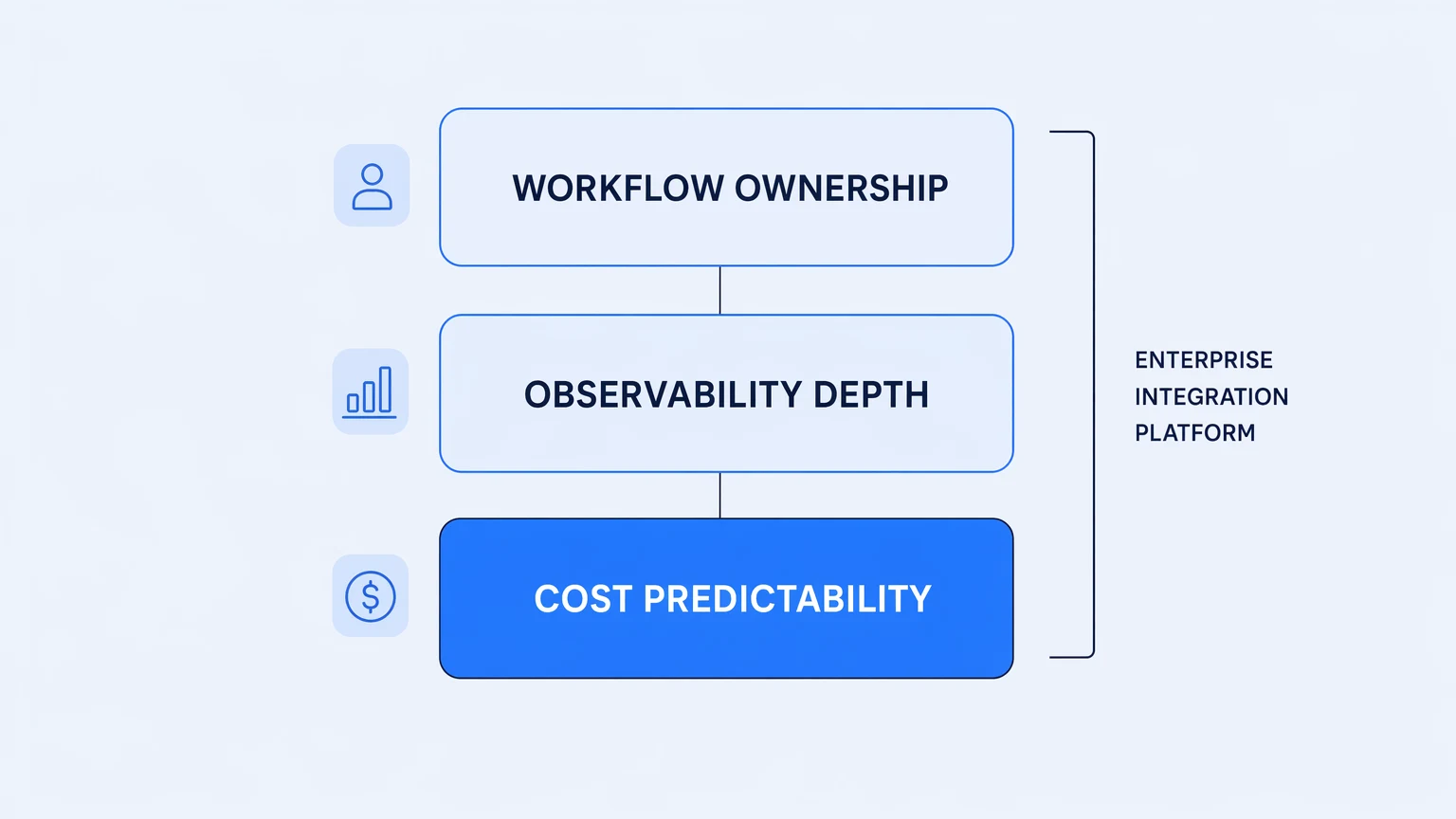
What separates an enterprise integration platform from everything else in the market isn't the feature list. It's whether the platform holds up when your workflows become load-bearing and your business depends on them. That distinction is really about whether enterprise integration is treated as an organizational discipline rather than a technology purchase.
This post is about what "enterprise-grade" actually means for an integration platform — not the marketing definition (AI, 500 connectors, SOC 2), but the operational one. The properties that determine whether a platform will carry production traffic for years, or whether it will extract a ramp-up cost from you every eighteen months.
"Enterprise" is a requirement set, not a price tier
The word gets used two ways. Vendors use it to name their most expensive package. Engineers should use it to name a set of non-negotiable production properties.
When an integration becomes load-bearing — when a failed workflow means a customer doesn't get provisioned, an invoice doesn't land in the ERP, an on-call alert doesn't fire — the platform needs to satisfy properties that the demo doesn't show. The salesperson demos the happy path. The happy path is not the job. The job is what happens when the upstream API starts retrying at 4x the expected volume, when a new engineer needs to understand a flow that's been running for two years, when the auditor asks for a timeline of every configuration change made in the last quarter.
The enterprise integration platform evaluation question isn't "can it connect Salesforce to NetSuite." Every platform in the category can do that. The question is: what happens to your team's operational surface area once it's in production?
The gap between "it works in the demo" and "it holds up in production" is where platform selection actually happens.
Three properties determine the answer, and all three are structural — which means competitors can list them in their marketing copy without actually having them.
The billing model is a production risk
Usage-metered pricing and production operations are at odds.
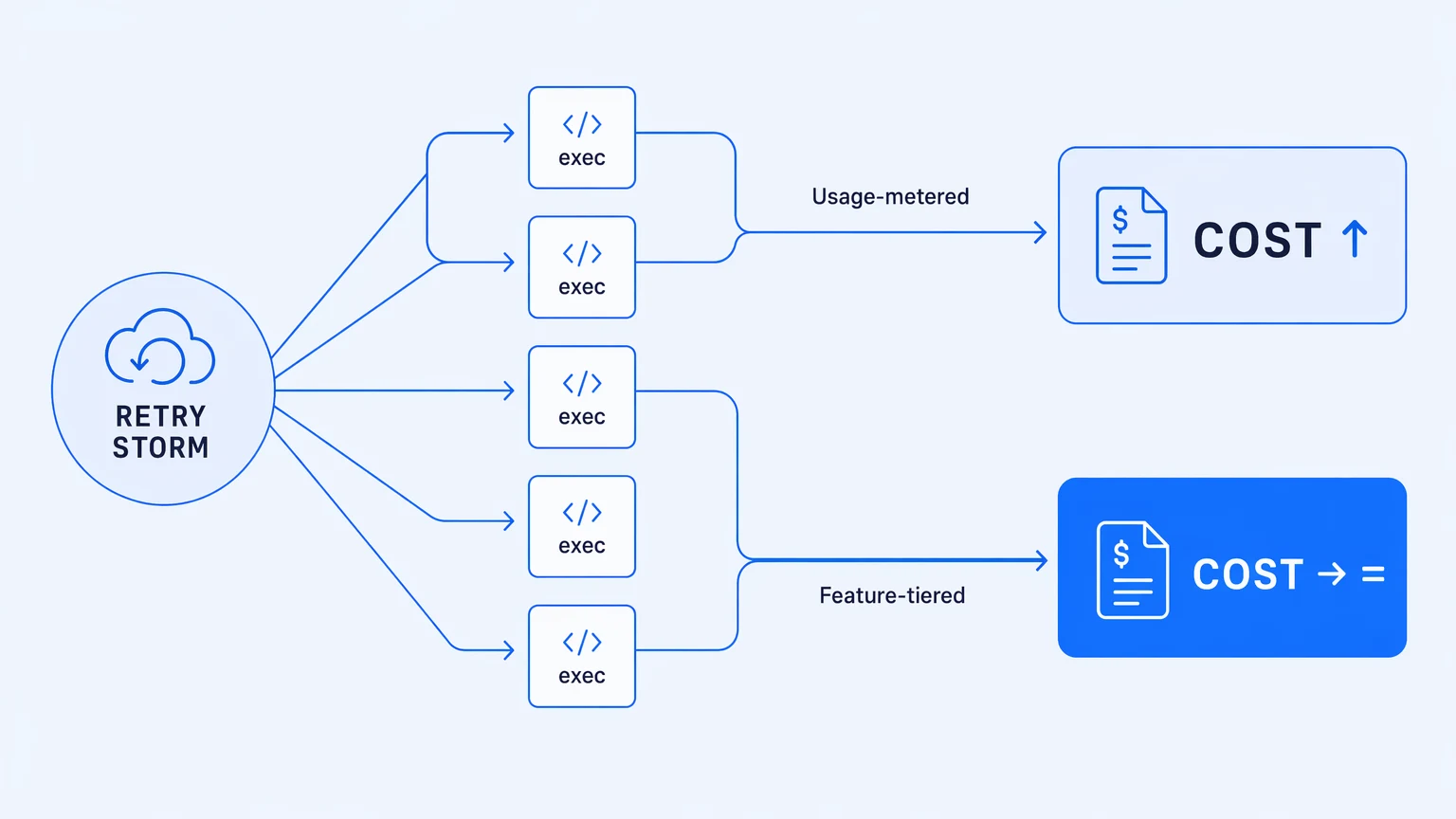
The pitch for usage-based billing is intuitive: pay for what you use. The production reality is that your integration's cost becomes a function of variables you don't control. An upstream partner's API starts retrying. A loop fans out wider than expected because of a data shape you didn't anticipate. A backfill runs over the weekend. The meter runs. Your invoice climbs. Finance asks why.
The mechanics compound it. On execution-metered platforms, retries typically count. Loop iterations count. Steps that completed before a workflow failed mid-run can still bill. You paid for execution that produced no business value. The meter's unit is a technical event with almost nothing to do with the outcome your team was trying to achieve.
This isn't a billing quirk you negotiate around. It's an architectural property of the pricing model. Cost coupled to traffic means your bill is most unpredictable exactly when your platform is under the most stress — a retry storm from a flaky vendor API, a partner sending webhook events overnight, a Monday-morning backfill someone kicked off on their way out on Friday.
The alternative is feature-tiered pricing: your bill scales with capability adoption, not execution volume. When traffic spikes, you see it in telemetry. Not in your invoice. You run retries and replays without billing anxiety. You backfill without a CFO conversation.
When your integration fails and starts retrying, you need your observability to spike — not your invoice.
When evaluating any enterprise integration platform, ask specifically: which events count toward the execution meter? What happens when the limit is reached — does the workflow halt, or do you get an overage charge? Ask for the billing definition in writing. A platform with no per-execution billing and no overage invoices will answer that question in one sentence.
Observability isn't a feature — it's the debugging surface
The way you find out that an integration failed tells you more about a platform's operational maturity than any feature matrix.
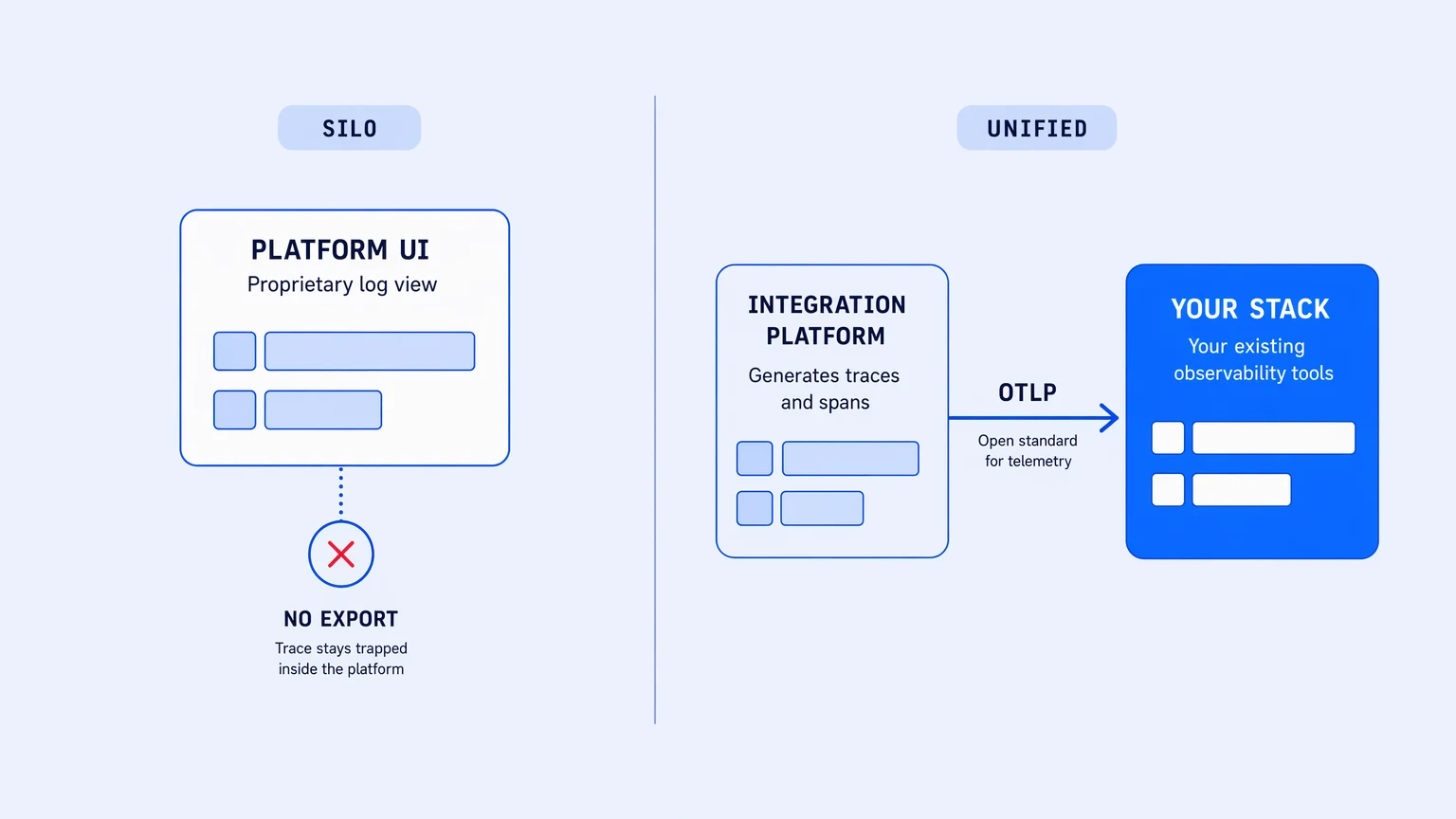
Most teams find out from a downstream team: a customer support ticket three hours after the fact, a partner's ops contact, a Slack message from someone who noticed the data looked wrong. The platform's UI shows a red status icon. You click into it and get a log viewer with the last 100 events, a timestamp, and an error message. You know something failed. You don't know what the system state was at the time, what the payload looked like, or whether the root cause was in your workflow or in the upstream API.
The better path is when the integration's trace lands in the same observability stack your engineering team already runs. The span shows up in Datadog, Honeycomb, or Grafana next to the application traces from the service that triggered it. The on-call engineer investigating a 3 AM alert isn't switching between a proprietary platform UI and their existing tools. The integration failure is a span in the waterfall they already know how to read.
OpenTelemetry makes the second pattern possible. An enterprise integration platform that emits OTLP-format traces, metrics, and logs on every tier — including the lowest one — lets integration observability land where engineering observability already lives. A workflow run is a trace. A failed activity is a span with a status code and a payload. Root-cause analysis uses the same filter-and-facet workflow your team runs for application failures.
The question to ask any platform vendor is not "do you have monitoring." It's "does your telemetry export as OTLP, on every tier, or only on the enterprise plan?"
Most platforms gate meaningful observability export to their highest tier. Some gate it to their streaming log product, which is a separate add-on. Some tell you to build the export pipeline yourself and link you to the docs on shipping logs to ELK. Native OTLP from the free tier is not universal. If your team's institutional debugging knowledge lives in your observability stack, an integration platform that keeps traces in its own silo will extend every mean-time-to-resolution you ever have.
Workflow ownership determines your exit options
There's a third property that rarely comes up until it matters enormously: who actually owns the integration logic?
Most platforms store workflows in a proprietary format on their servers. You can read and edit workflows in their UI. You can export them in their schema. What you cannot easily do is take them somewhere else. When you outgrow the platform, when a pricing change makes renewal untenable, when an acquisition changes the roadmap in a direction you didn't sign up for — the migration cost lands entirely on your team. The platform kept the runtime. You kept the spreadsheet.
Real Git integration is a different thing. When workflows are version-controlled as files in your own GitHub or GitLab repository — not snapshot-exported as backup archives, but actually tracked in your own repo with branches, commit history, and tags — the integration logic is yours in the same way your application code is yours. You review changes through your existing pull request flow, against your normal GitHub or GitLab provider. You roll back to any point in the history. You run a diff between what's in staging and what's in production. The audit record your compliance team needs is the same commit history your engineers already maintain.
There's a real difference between "we support Git" and "your workflows are real Git files in your repo." The first can mean backup exports pushed to a bucket on a schedule. The second means the platform's source of truth is the repo you own, and the platform is the runtime — not the system of record. Ask specifically: where does the canonical version of a workflow live? What does the vendor's own documentation say about editing outside the platform? If they warn against it, the Git story is a backup story.
Workflow logic that lives only in the vendor's format is a liability that doesn't appear on any feature matrix — it appears on the offboarding invoice.
There's a longer version of the production-operations argument — covering billing mechanics, trace export, and version control in more depth — in the production-honest iPaaS guide.
Why most enterprise integration platforms fail the enterprise test
Many platforms marketed as "enterprise" fail at least one of these three properties. Usage-metered billing at the feature tier that most mid-market teams can afford. Observability that lives in a proprietary UI and doesn't export. Version control that's actually snapshot backup under a Git-branded name.
The market has largely stopped calling itself "integration" altogether. Most vendors have rebranded around AI orchestration. The rebrand is cosmetic. Underneath the AI agents and workflow copilots, the same pricing mechanics run, the same proprietary log viewer shows the failures, the same JSON on their servers holds your workflow definitions. AI is a useful capability on top of a solid integration substrate. It doesn't substitute for one.
At Professional tier ($399/mo), Koodisi ships the full feature set — OpenTelemetry on every tier from the free plan, real Git versioning with in-platform branching and PR flows through your own GitHub or GitLab provider, and no per-execution billing or overage invoices — without an implementation partner or a procurement cycle. If your team has outgrown lightweight automation tools and the enterprise iPaaS quotes are landing in the six-figure range, that's the gap this platform sits in. Start on the Community tier and bring a real workflow.
The demo will look clean wherever you take it. The three questions above are the ones to ask after.