The demo always looks the same. Sales engineer opens a drag-and-drop canvas, wires a Salesforce trigger to a Slack notification in four clicks, and asks if you have any questions. You don't. You also know that workflow will never exist in your actual system, and that the one you care about — the one syncing orders between three ERPs, retrying on failures, validating against a schema that changes quarterly — will look nothing like what just ran on the screen.
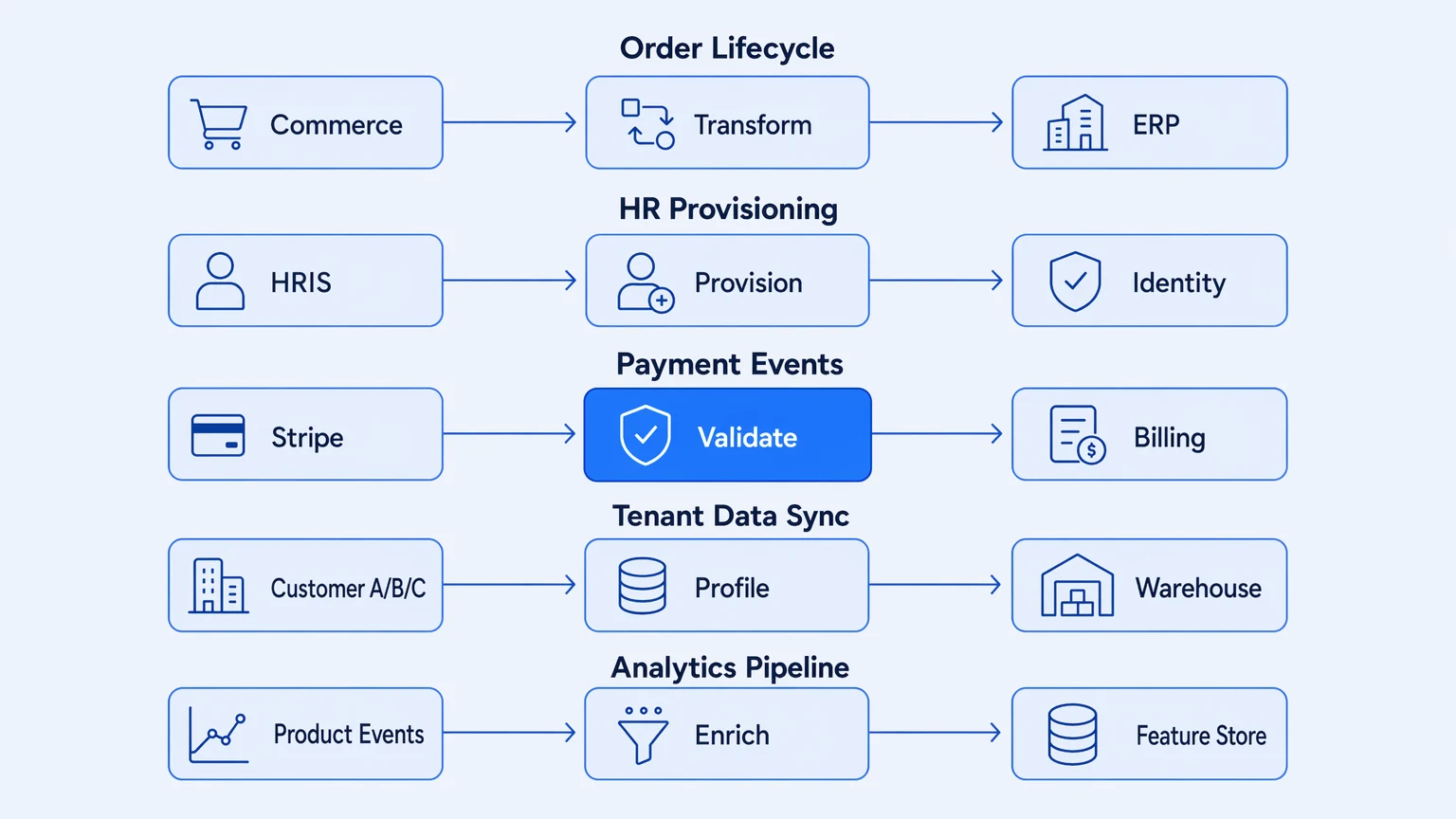
These are also, not incidentally, the patterns that expose whether a platform's production properties hold up past the demo. iPaaS examples in the real world are not Salesforce-to-Slack. They are the messy, stateful, compliance-adjacent flows that engineering teams inherit and eventually own. The five patterns below are what mid-market teams actually run in production. Each one reveals a different thing a platform either handles gracefully or makes your problem.
1. Order lifecycle sync across ERP and commerce
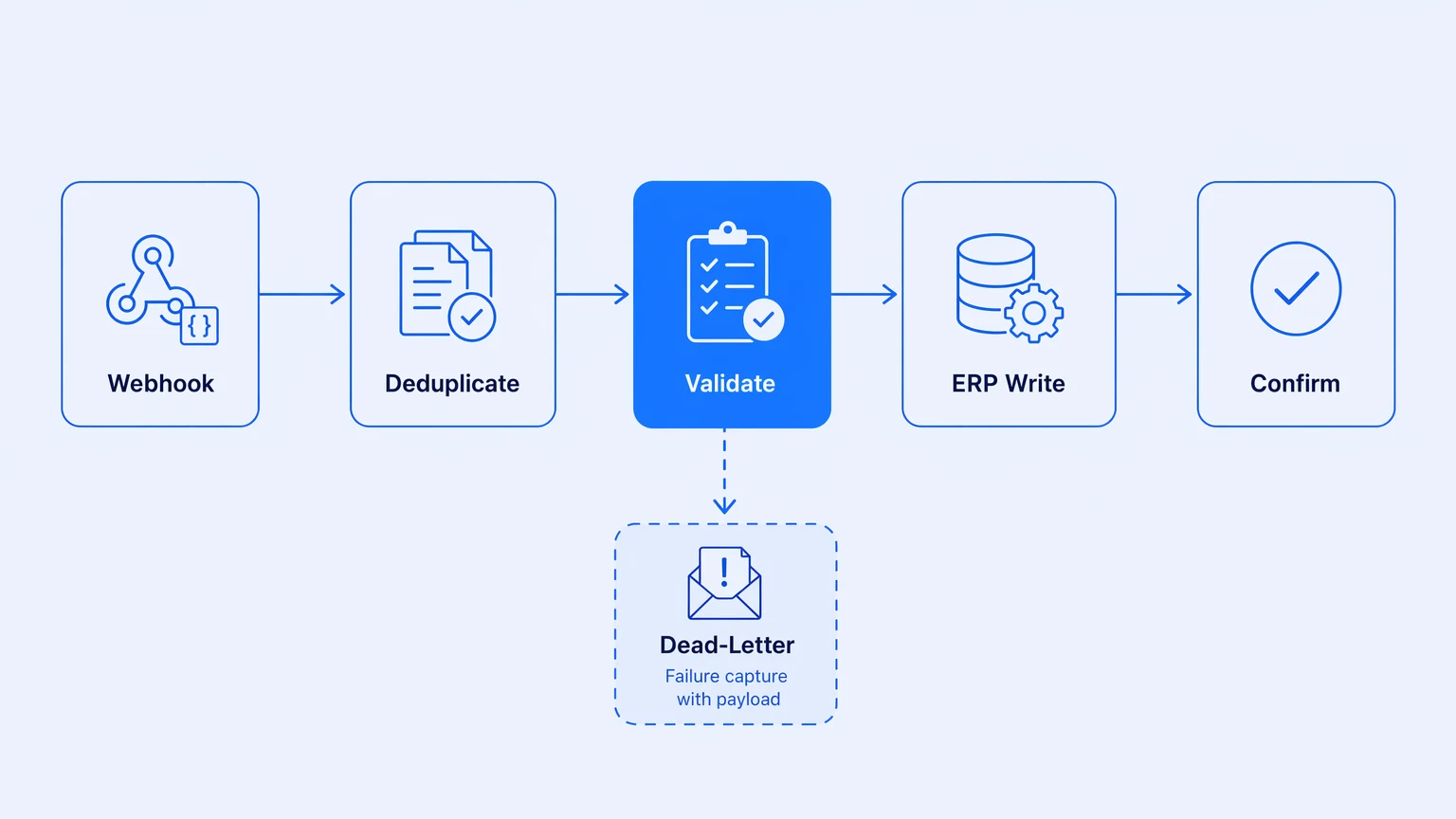
The pattern: an order placed in a commerce platform flows to an ERP, triggers fulfillment, updates inventory, confirms back. Four steps on paper. In practice you are dealing with a webhook that fires up to three times per event, a source system that sends incomplete records until payment clears, and a destination ERP whose rate limit you did not discover until the first holiday sale.
Most teams solve this by gluing together a lightweight automation tool for the trigger, a cloud function to buffer and deduplicate, and a script to handle the ERP write. The result is a distributed system with no consistent observability across its seams. When an order fails silently, you find out when the warehouse emails you three days later.
What this pattern demands is not a prettier UI for the four-step diagram. It is idempotent message handling, dead-letter capture with full payload context, and a trace you can follow from webhook receipt to ERP confirmation in a single view.
The integration layer earns its keep when a 3 AM failure produces a trace, not a mystery.
2. HR system provisioning on employee events
This is the workflow everyone underestimates. A new hire event in the HRIS has to provision accounts across identity, the product the team ships, ticketing, and payroll — plus sometimes a half-dozen line-of-business tools with no API. Each system expects a slightly different data shape. The ones owned by HR rather than engineering are managed by a team that cannot tell you when the schema last changed, let alone when it will change next.
The onboarding flow is easy to wire once. It stays broken in subtle ways. An attribute that mapped correctly six months ago starts arriving as null. A provisioning step that completed silently is now returning a 202 you need to poll. Nobody notices because the original integration was built by someone who has since left, lives in a tool without version history, and emits no telemetry your SRE team can query.
The failure mode is not the initial integration. It is the unmaintainability of integrations that have no version history, no schema contract, and no trace.
This is where the argument for owning your integration layer rather than renting it sharpens: the provisioning flow is exactly the kind of load-bearing logic engineering teams need to hold in their own repo, observable through their own stack — not locked in a vendor's UI where nobody can diff it.
3. Financial reconciliation and payment event processing
Payment events are time-sensitive and compliance-adjacent. A webhook lands, has to update your billing system, write to the data warehouse, trigger a revenue recognition event, optionally fire a customer notification. If the webhook is a retry from the delivery provider, your pipeline has to recognize that and not double-process.
The pattern looks simple in a demo because the demo uses a synthetic event with a well-formed payload. In production, events arrive out of order, occasionally missing fields that older versions of the pipeline never needed to null-check, at a rate that spikes hard on the first of every month.
The right foundation is schema validation at the inbound boundary, idempotency keying on the processing side, and a delivery-failure record that captures the full original payload and makes replay possible without reconstructing the event from scratch. Observability is not optional — every finance auditor will eventually ask you to show exactly what happened to transaction X at time Y.
| What you actually need | Why it matters in this pattern |
|---|---|
| Schema validation at inbound | Catches upstream API changes before they corrupt downstream state |
| Idempotency on processing | Prevents double-write on Stripe retries and internal reruns |
| Full payload on delivery failure | Makes replay possible without event reconstruction |
| Trace per event | Gives auditors a queryable record, not a log grep |
4. Multi-tenant SaaS data sync per customer
If you run a B2B SaaS product, you have customers who want their data synced to their own downstream systems — their own Salesforce, data warehouse, or ERP. The naive implementation is one integration per customer, forked at the logic layer. It works until customer 12, when you realize you have 12 slightly different versions of the same workflow with no way to roll a fix to all of them at once.
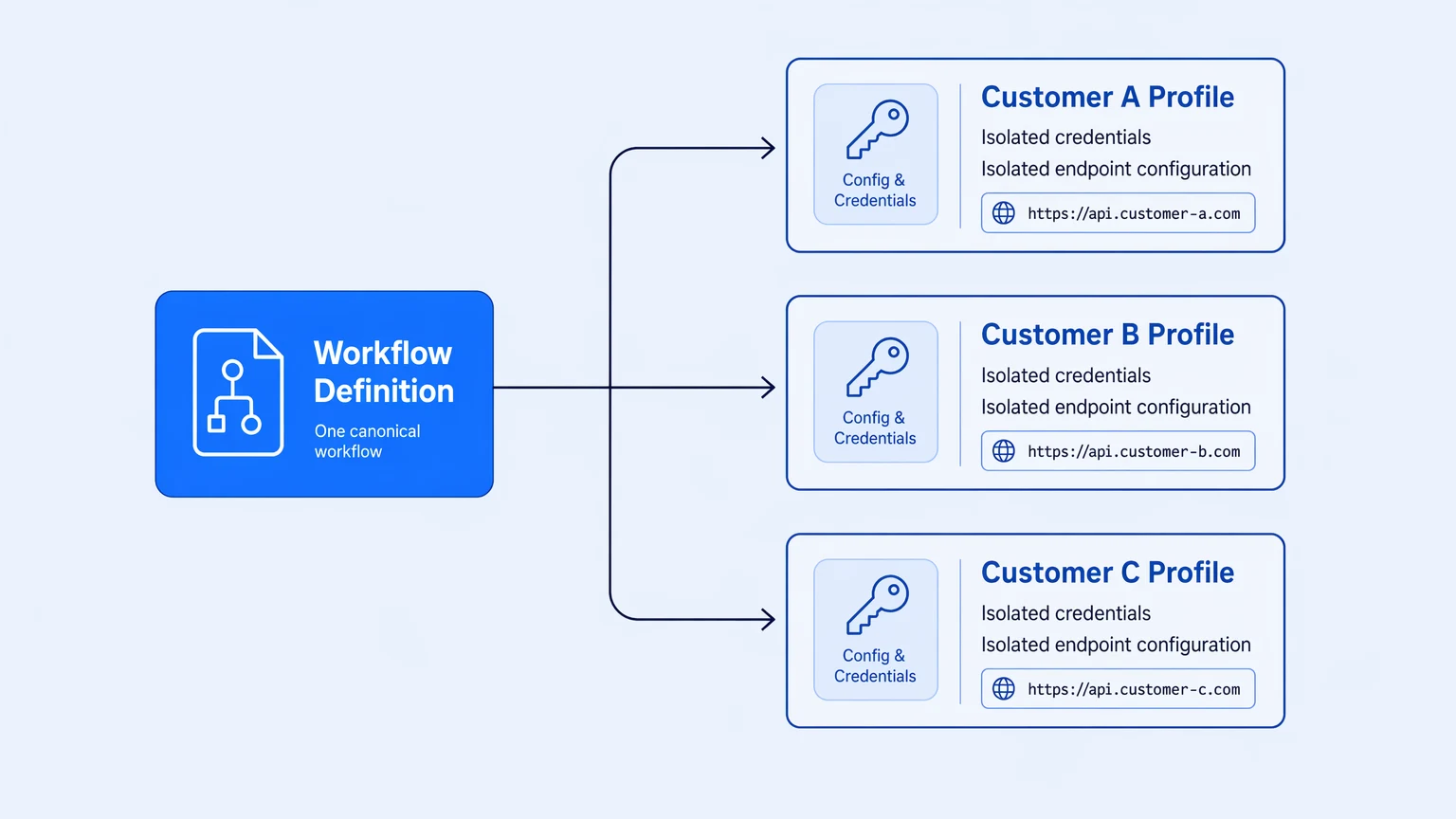
The pattern that actually scales is one integration definition parameterized per customer, with profile-driven configuration handling differences in endpoint, credentials, and schema mappings. The workflow is the same artifact; the runtime configuration is what differs.
This is a multi-tenancy problem inside your integration layer, not inside your product. The engineering question is whether your platform supports profile-scoped runtime configuration — or forces you to fork.
Most platforms treat each integration instance as an independent artifact. Scaling to dozens of customers means managing dozens of artifacts.
A profile model, where one workflow serves multiple tenants with isolated configuration and credentials, is what mid-market platform teams end up building themselves when the tool does not support it natively. The operational overhead is real and it compounds.
5. Event-driven data pipeline for analytics and ML features
A lot of B2B product features now depend on near-real-time data: usage-based pricing, health scores, churn signals, recommendation systems. The integration pattern behind them is an event stream from your product through transformation and enrichment and out to a feature store or analytics warehouse.
The happy path is not the problem. Drift is.
The product changes faster than the pipeline contract. An event schema you relied on starts arriving differently. A third-party enrichment service starts returning nulls on a field your ML model has been treating as required. The pipeline handles it silently, writes the bad data, and three weeks later someone wonders why churn prediction scores went flat.
The most expensive integration bugs are not the ones that crash the pipeline. They are the ones that let bad data through quietly while your features degrade.
What this pattern needs is schema enforcement at the pipeline boundary, transformation logic versioned alongside the workflows, and traces that surface schema drift before it corrupts downstream models. The tooling choice matters because the cost of investigating a bad data event in an unobservable pipeline is measured in engineering-hours, not compute.
What these five patterns actually reveal
These are not edge cases. They are the canonical workloads mid-market engineering teams run in production. What they share is instructive.
Every one of them requires stateful logic that outlives its original author. Every one touches compliance in some form. Every one will eventually break in a way you cannot debug without a trace. And every one will run more than you expect — which means predictable billing is not a nice-to-have. It is a prerequisite for promoting any of these to production without a CFO conversation.
The question for iPaaS selection is not "can it wire up Salesforce to Slack?" It is: what happens when this breaks in production, and can I debug it, trace it, version it, and own it?
Koodisi is built for these patterns — workflows versioned in Git, OpenTelemetry traces on every tier from the Community free tier, no per-execution billing, no overage invoices. Community starts at $0, Professional is $399/mo with unlimited executions. No implementation partner required to get started.