You already know the promise. Integration platform, connect everything, automate the manual steps. You've seen the demo where the CRM syncs to the billing system and nothing breaks. What you probably haven't seen is the 2 a.m. Slack message six months after deployment, when that sync runs for the eight-hundredth time, fails silently, and nobody knows until a sales rep asks why a customer's record is wrong.
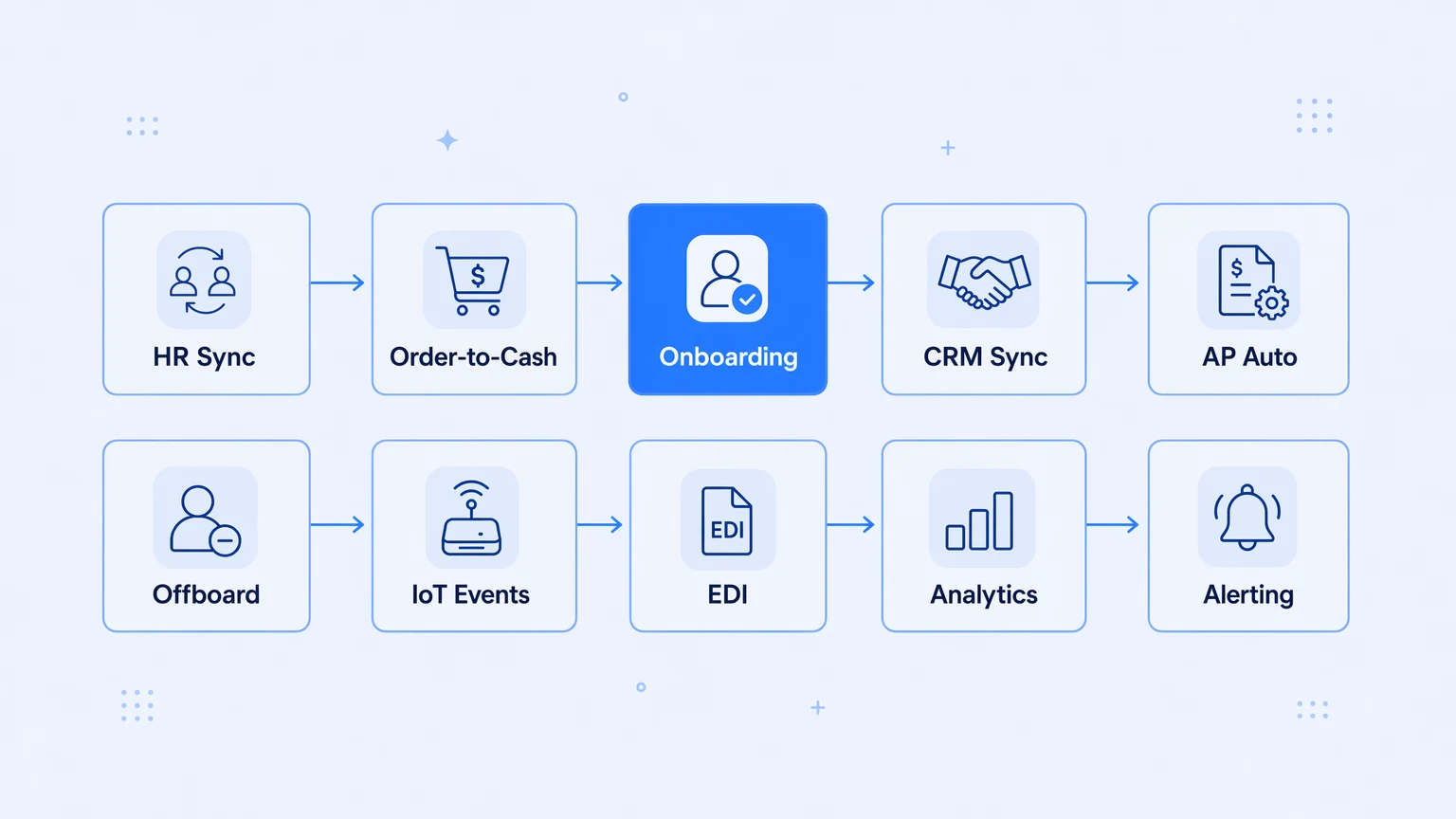
This isn't a happy-path list. It's the ten iPaaS use cases that actually move the needle — framed around what goes wrong in each one when the plumbing isn't production-grade, and what production-grade actually means once a platform is running real traffic.
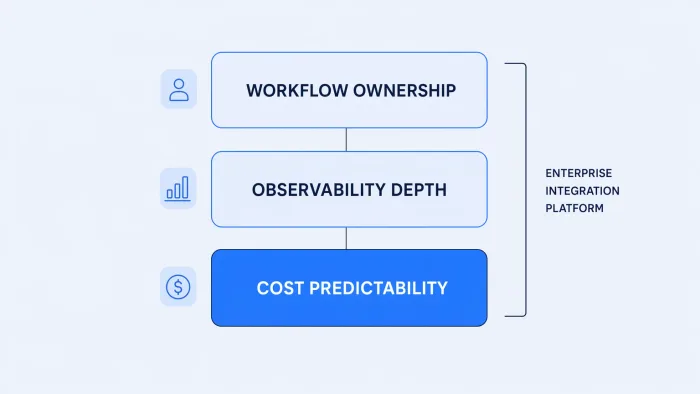
The real question isn't whether an integration platform can automate a workflow. It's whether it can keep that workflow running, observable, and cheap in month fourteen.
1. Hire-to-payroll: syncing HR systems without the spreadsheet bridge
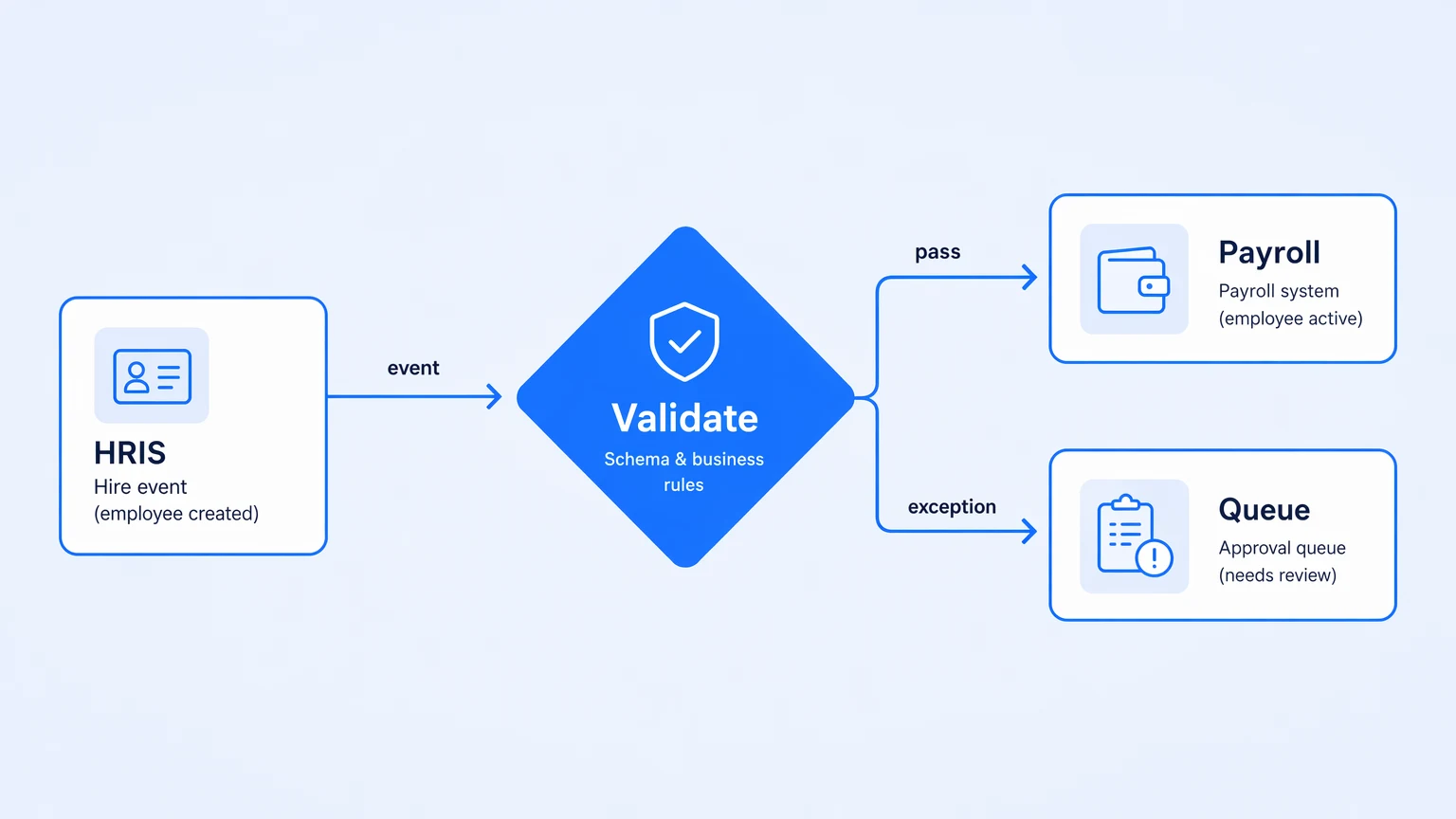
New hire arrives. Someone manually exports from the HRIS, reformats a CSV, imports into payroll, checks for duplicates, sends a Slack confirmation. If anyone is out that day, it waits.
Hire-to-payroll is one of the highest-leverage iPaaS use cases because it's where manual data entry causes the most downstream pain — wrong pay, missing benefits, compliance gaps. A well-built integration triggers on HRIS events, validates against a schema, routes exceptions to an approval queue rather than silently dropping them, and keeps a trace of every record that moved.
The failure mode vendors gloss over: schema drift. The HRIS vendor ships a breaking field rename. Your workflow swallows the error. Payroll runs on stale data. The trace tells you exactly which record failed and why — if you have one.
2. Order-to-cash: connecting storefronts, ERPs, and finance
Ecommerce order comes in. It needs to land in the ERP, generate an invoice, decrement inventory, trigger fulfillment. Five systems, each with its own schema, each with its own rate limits and retry semantics.
The iPaaS pattern here is Splitter/Aggregator: fan the order event out to each downstream system, wait for confirmations, handle partial failures with dead-letter logic rather than silent drops. What breaks in lighter automation tools is exactly this — they handle the sunny day, then fail silently when the ERP returns a 429 and the retry isn't instrumented.
Automated pipelines that fail silently under load are just manual work with extra steps — you find out about the failure the same way you found out about the manual error, three days later from a customer.
3. Customer onboarding: provisioning across SaaS tools in sequence
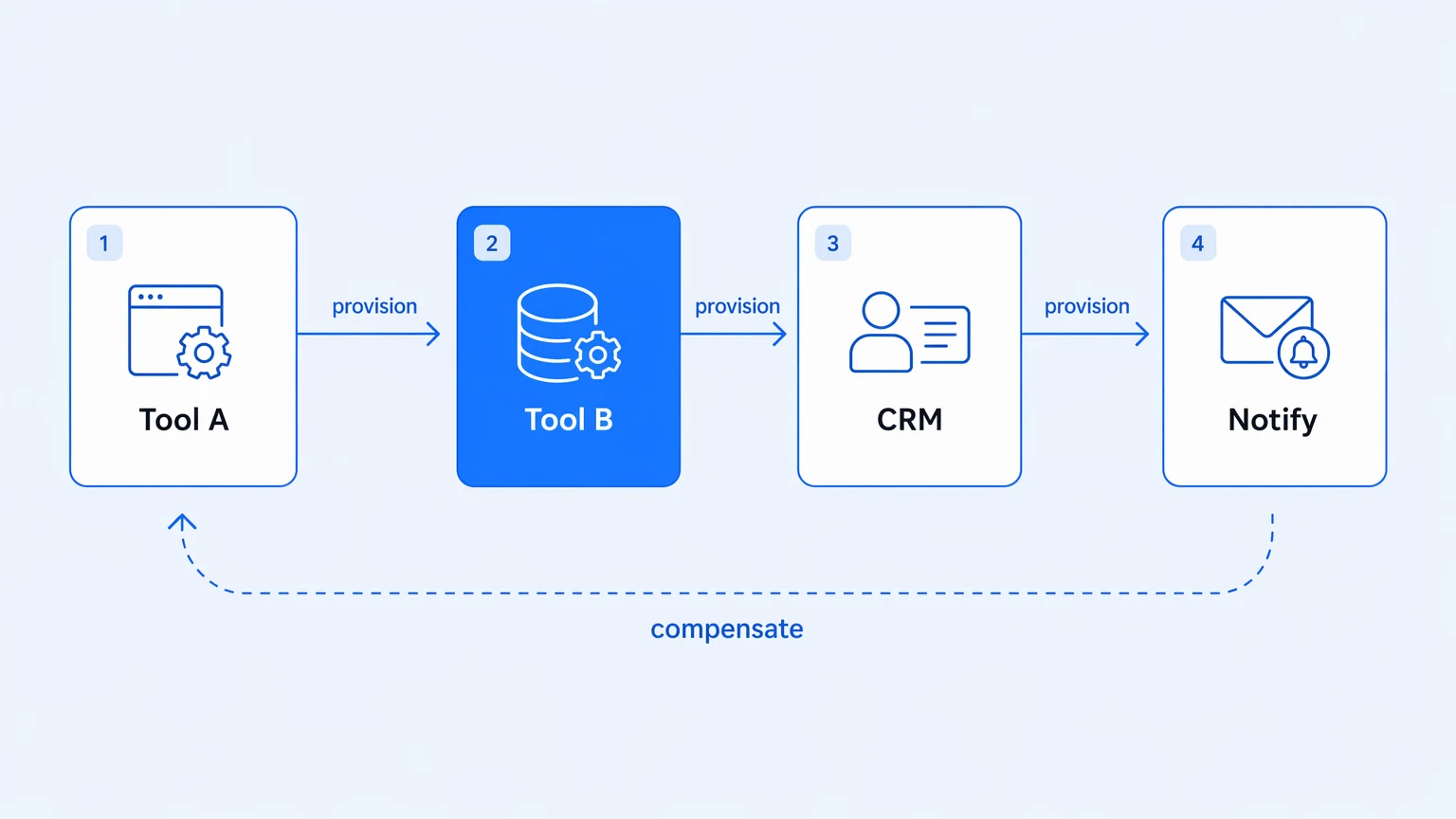
A new customer signs. Someone needs to create accounts in four tools, add them to the right Slack channels, trigger a welcome email sequence, update the CRM, and notify the CSM. When the sequence breaks at step three, the CSM often never knows.
This workflow has a tolerance for failure near zero, and it's customer-visible. The correct integration pattern is a Saga: each step either completes or compensates (rolls back) if a downstream step fails. The observability requirement is tight — you need to know exactly which step failed for which customer, not just "something went wrong in onboarding."
The onboarding pattern is where integration debt becomes customer churn.
4. Data sync between CRM and support tools
Your sales team closes deals in the CRM. Your support team tracks tickets in the helpdesk. Neither system knows what the other knows unless someone built the bridge — and most teams built it with an export-import loop that runs nightly and drifts.
A real-time sync with bidirectional conflict resolution is a different thing. The right integration uses an Idempotent Receiver pattern (no duplicates when the sync runs twice), publishes field-level change events, and keeps an audit of which system won a conflict. The part that matters most isn't the workflow code — it's the lookup table of canonical field mappings that you don't want to redeploy every time a field name changes.
5. Invoice processing and AP automation
Finance receives invoices as PDFs. Someone opens each one, extracts line items, enters them into the ERP, routes for approval, pays. Every step is manual. Every step is error-prone.
AI extraction and structured output validation are genuinely useful here: extract invoice fields, validate against a schema, pass structured data to the ERP, hold exceptions for human review. The integration pattern is a Claim Check — store the raw PDF, pass a reference, pull the payload only when needed. Clean pipeline, fast throughput.
The production requirement that most finance teams don't think about until it bites them: dead-letter queues for invoices that fail extraction, with full payload replay so finance can reprocess without re-receiving the document.
6. Multi-system employee offboarding
An employee leaves. Within the first hour, their access needs revoked across every system they touched. Most teams have a checklist. The checklist is always incomplete.
The integration here is audit-critical: every revocation needs a timestamped record, every system needs a confirmation, and any failure needs to fire an alert immediately rather than sit in a log nobody reads. SCIM provisioning handles identity systems cleanly, but SCIM doesn't reach your custom internal tools, the legacy file shares, or the third-party SaaS nobody thought to include when you wrote the runbook.
Offboarding is the use case where "good enough" integration becomes a compliance problem.
7. IoT and telemetry event pipelines
Manufacturing equipment, logistics sensors, retail footfall data — whatever the source, the shape is consistent: high-volume events, asynchronous ingestion, downstream routing to different consumers. Kafka or similar messaging is usually in the picture. The iPaaS layer handles routing, transformation, and exception handling so your engineering team isn't writing and maintaining per-consumer Lambda scripts.
The right pattern is Publish-Subscribe with a Content-Based Router: inspect the event type, route to the right downstream system, handle serialization, surface failures in a trace rather than a log line. This is one of the iPaaS use cases where OpenTelemetry traces become genuinely operational — you need to know, per event type, per source device, whether throughput degraded, and you need that answer in your existing observability stack, not in the platform's built-in UI.
8. Partner and EDI data exchange
B2B data exchange — EDI X12, EDIFACT, flat-file formats from trading partners — is the use case most vendors hate to talk about because it's slow, fiddly, and the edge cases are vicious. A single malformed segment in an 850 purchase order can stall a retail shipment.
The iPaaS job here is transformation and validation: parse the EDI document, validate against schema, transform to internal format, route to the ERP, and surface parsing errors with the offending segment context intact. This is genuinely a case where data-shape contracts (JSON Schema, Avro, or similar) enforced at ingestion prevent downstream corruption rather than just reporting it after the fact.
9. Marketing and product analytics pipelines
Conversion events, product usage telemetry, campaign attribution data — all of it needs to reach the data warehouse without a hand-rolled Lambda function that every new analyst has to reverse-engineer.
The integration pattern is Change Data Capture out of your product database, transformed into an analytics-friendly shape, loaded into the warehouse. The engineering discipline that matters here is version control: when the product adds a new field or renames an event, the pipeline gets updated through a reviewed change, not a click-save in an admin UI.
This is where the ownership argument becomes concrete. If the pipeline logic lives in a vendor's database, the analyst who knows it will eventually leave. If it's versioned in your repo, the new analyst reads the diff. The longer argument for owning your integration layer as software lives in why unobservable integration stacks are the real hidden bill.
10. Cross-system reporting and alerting
When a customer's order is stuck, when an SLA threshold is about to breach, when an API partner returns an elevated error rate — you want one place to look, not five.
The pattern is Wire Tap and event aggregation: workflows emit observability events as they run, those events feed a unified alerting layer, and alerts fire with enough context for the on-call engineer to diagnose without opening a second tool. This is less a use case and more an outcome. When the iPaaS use cases above are built on an observable foundation, cross-system reporting comes for free. When they're not, it requires a separate analytics project for every failure mode you didn't anticipate.
A unified alert means the integration layer is observable. Most teams discover they don't have one the first time they get paged.
The common thread
Ten different shapes of the same problem: systems that don't talk to each other, and manual work in every gap.
What separates production-grade iPaaS use cases from automation scripts that break at month six isn't the happy path — it's what happens on the bad day. Does the integration logic live in version control, where changes can be reviewed and rolled back? Do failures surface in a trace with enough context to diagnose quickly? Does the bill hold flat when a workflow runs ten times more than anyone expected?
Most teams don't fail the use case in demo. They fail it at the ninth month, when schema drift breaks the hire-to-payroll sync, or when the order-to-cash pipeline retries three times under load and the question becomes: were those retries billed?
Koodisi ships OpenTelemetry on every tier from the Community plan, real Git versioning with in-platform branching and PRs through your existing GitHub or GitLab flow, and no per-execution billing, no overage invoices on Professional and above. If any of the ten patterns above live on your current stack and you're not sure what failed last Tuesday, the Community tier is free to try — 30 workflows, no credit card.