
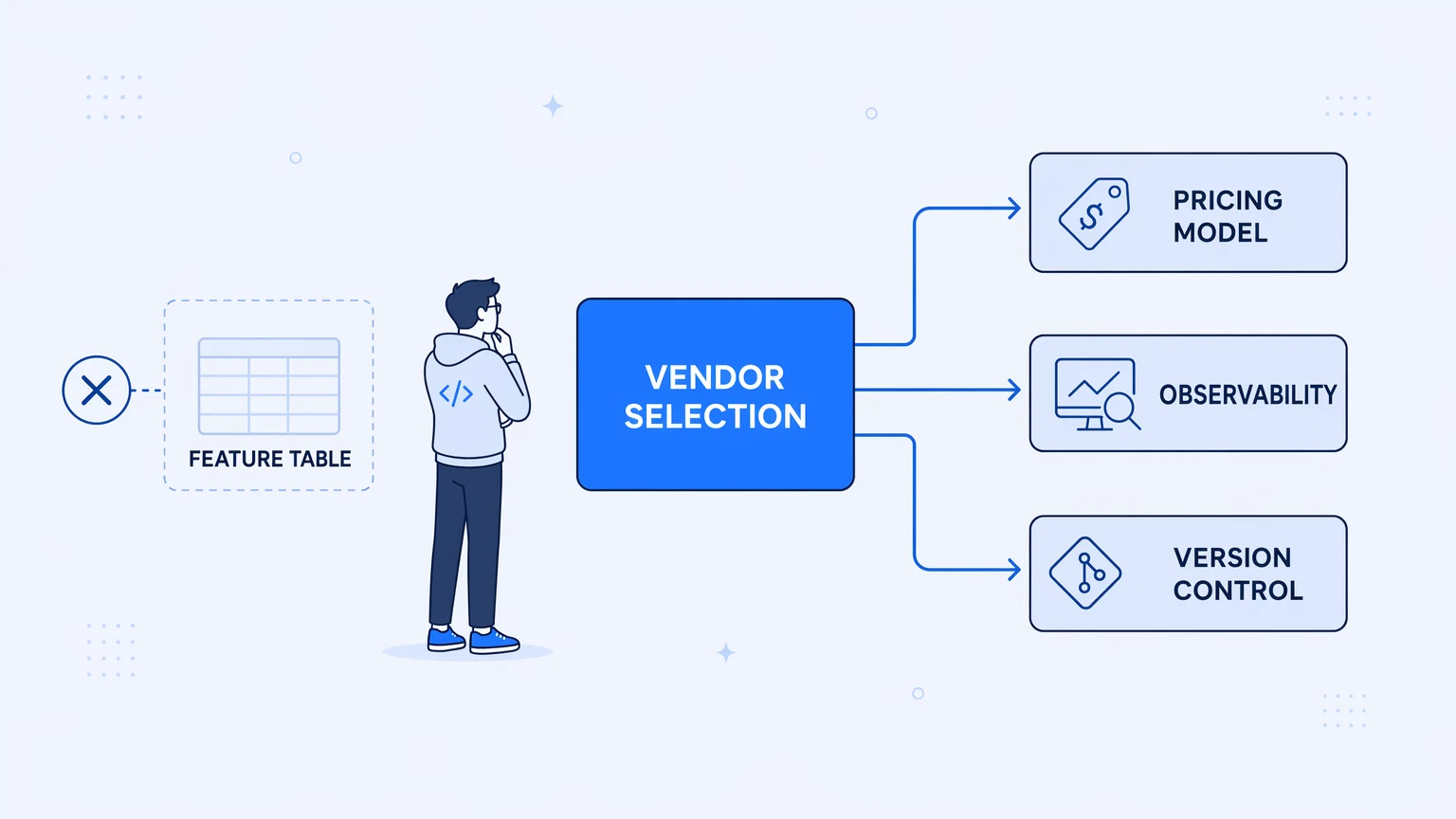
The evaluation starts with a spreadsheet. Rows: vendors. Columns: connector count, pricing tier, AI capabilities, SOC 2, "version control: ✓." You score everything, weight the scores, and rank the results. Then you pick the winner, get the contract signed, and six months later you're debugging a production failure in a UI you've never liked, trying to explain to finance why last month's invoice was 2.4x the forecast.
This is how most iPaaS vendor selections go wrong. Not because the evaluation was lazy — because it measured the wrong things, the same ones the production-honest guide to what iPaaS actually is argues most explainers gloss over.
Feature tables are optimized for what's easy to demo, not what's hard to run. Every serious platform in the category checks the same boxes: a long connector list, some flavor of AI integration, a compliance logo, a version-control claim. Vendors know what the RFP asks for and they answer it. What the RFP doesn't ask — and what separates the platforms that work quietly in production from the ones that generate incident reports — is how three structural things behave under pressure: the pricing model, the observability export, and what "version control" actually means in practice.
Those three are worth more than any feature count. Here's how to read them.
iPaaS Vendor Comparison Criteria
Three criteria separate the platforms that hold up in production from the ones that generate incident reports. Here's what to ask each vendor, and the answer that should worry you.
| Criterion | What to ask the vendor | Red-flag answer |
|---|---|---|
| Pricing model | What happens to my bill when a partner API retries or a backfill runs long? | The answer dodges the question, or calls it rare. |
| Observability portability | Can I export traces and logs to my own stack, not just your dashboard? | Observability only exists inside the vendor's own UI. |
| Source control reality | Is a workflow a versioned file I can diff and review, or UI state I can't export? | “Version control: ✓” means an internal changelog, not exportable source. |
The pricing model is not just a number
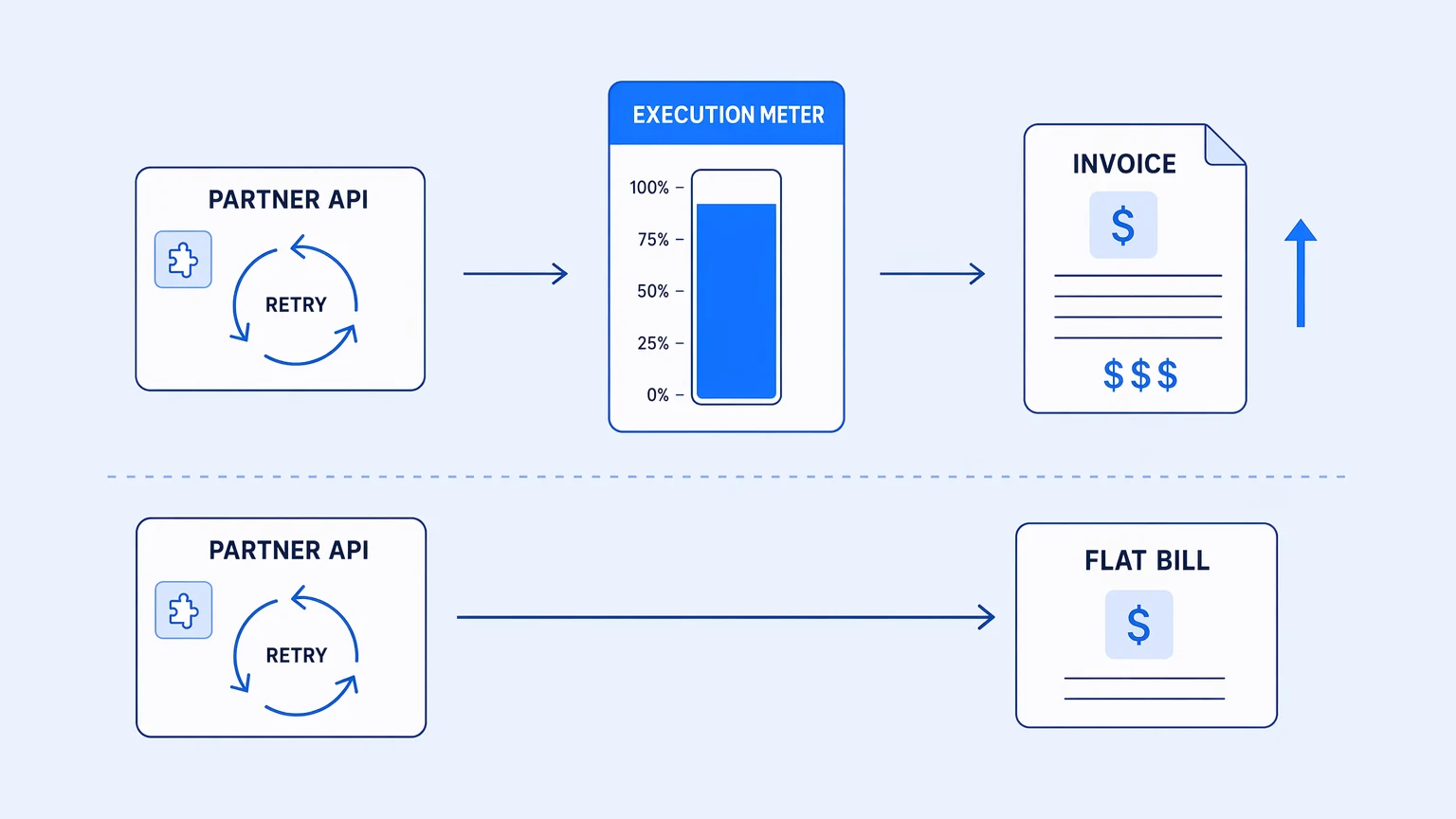
The most common mistake in an iPaaS vendor comparison is treating price as a point — "$X per month" — and leaving it there. The number tells you the floor. The model tells you the ceiling, and in usage-metered categories, the ceiling is not yours to set.
Usage-metered pricing sounds fair until you realize that the unit you're charged for is often decoupled from the value you're receiving. On platforms that bill by task, recipe execution, or operation, the meter runs on things you don't control: a partner's retry storm, a loop that bounded wider than expected, a backfill kicked off on a Friday afternoon. Steps that completed before a workflow failed mid-run still bill on some platforms. Retries bill. Dev and test runs bill against the same pool as production. The cost is a function of how chaotic your upstream is on any given day, not how much business value moved through the system.
The category-wide trust problem here is significant. Most of the major ipaas vendors have made pricing changes in the past two years that have caught their customers mid-contract. Overage rates typically run 2–3x bundled rates. Gartner reviews for multiple platforms list "annual price increases" as the top complaint, unprompted, across hundreds of separate reviews. The people writing those reviews are engineers and platform leads who thought they'd done a thorough evaluation.
The pricing model predicts whether your integration bill is yours to control or your upstream's to set.
So the question isn't what the vendor charges. It's: what happens when a partner retries aggressively for four hours? Does the bill move? Can you answer that question with a number, or do you have to say "it depends"? A feature-tiered model — where cost scales with capability adoption, not execution volume — gives you a number. A usage-metered model gives you a distribution.
This matters more as your integrations become load-bearing. A form-to-spreadsheet automation that occasionally fails is fine on any pricing model; the cost swings are noise. A workflow that processes payroll sync, event ingestion, or real-time order routing is a different thing entirely. The pricing model is infrastructure; treat it like one.
Every vendor claims observability — ask where the data actually lands
"Monitoring" is on every iPaaS vendor comparison sheet. It is nearly useless as a criterion, because every platform has some form of it and none of them mean the same thing by it.
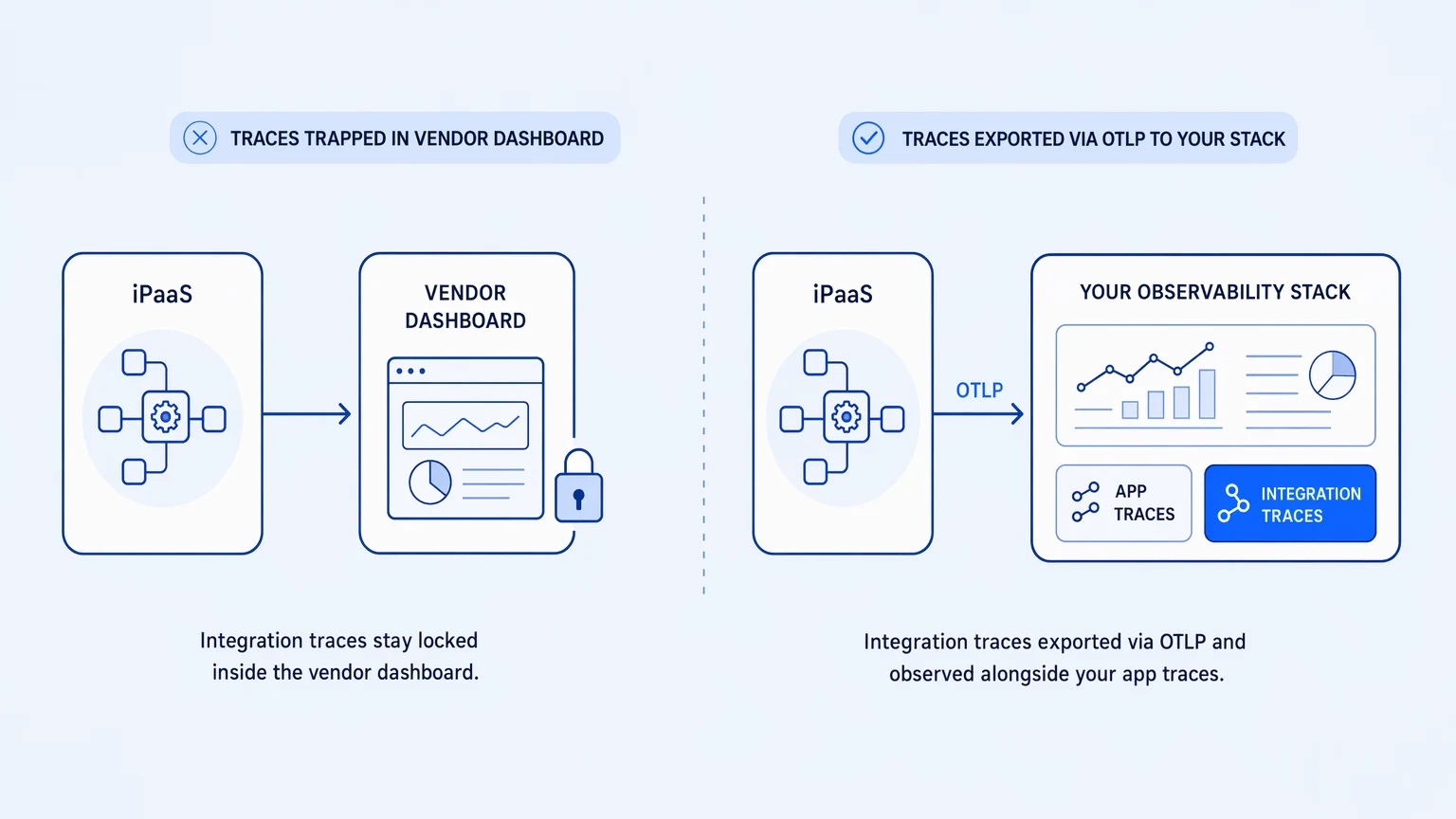
What most platforms actually ship is a run history inside their own UI: a list of executions, green and red, with a payload viewer for the failures. That answers "did it run." It does not answer "why did this specific step take nine seconds and then hand the next step a malformed payload" — which is what you need at 2 a.m. when downstream is paging you. For that you need distributed traces: real spans, with timing and attributes, that you can correlate against the rest of your system.
The tell is not whether a platform has a monitoring dashboard. It's whether the telemetry can leave. Specifically: can you export OpenTelemetry traces in OTLP format, on every tier, to the observability stack you already run?
On most platforms in the category, the honest answer to that question is no — or "on Enterprise," or "you can stream logs yourself if you write the integration." Observability gets gated as a premium feature or delegated to the customer as an exercise. The result is that your integration layer — the most failure-prone surface in your architecture, because it's where external systems meet yours — becomes the one tier you can't see from the tools your on-call team already knows.
The standard worth demanding is OpenTelemetry on every tier, from the free tier up, with OTLP export to wherever your application traces already land: Datadog, Honeycomb, Grafana, Elastic, Splunk. When your integration spans live next to your application spans in the same tool, root-cause analysis is a filter operation, not a reconstruction exercise.
The observability you need at 2 a.m. is useless if it lives in a dashboard you have to log into separately.
This is not a luxury. It's the minimum bar for any integration that would generate a page if it failed. The question to ask every vendor: can I see a span from my integration workflow in my own Datadog account, on the tier I'd actually sign up for?
"Version control: ✓" is doing a lot of work in the wrong direction
Every serious iPaaS vendor now claims version control. The claim ranges from true to barely defensible, and reading past it is worth the effort.
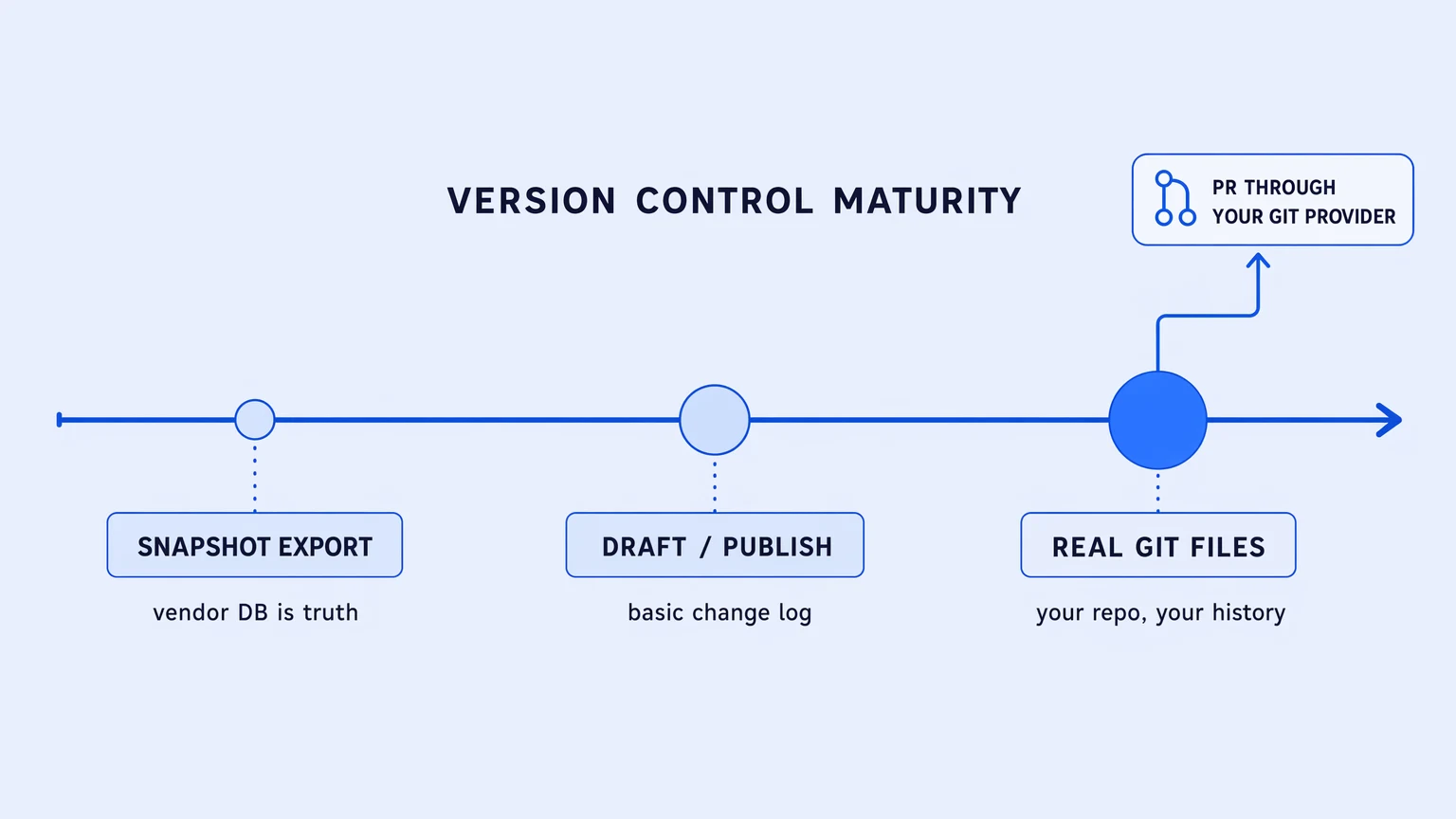
The honest version of the spectrum looks roughly like this. At the weak end: a snapshot export — the platform lets you download a JSON file representing your workflow. You can push that to a repo. The platform itself warns you not to edit the file outside the platform. The source of truth is still the vendor's database; GitHub is a backup directory. At the middle: draft/published state plus a basic change log, adequate for solo development but not for team-scale review or rollback. At the strong end: the application is a real file in your own Git provider — GitHub, GitLab, self-hosted — and you branch in the platform with naming policies your org enforces, then raise pull requests through your existing Git flow.
The practical gap between these is not subtle. When you need to diff a change before it ships to production, snapshot exports give you nothing useful. When you need to roll back a bad deploy to a known-good commit, you want real Git history, not a vendor-managed log. When a new engineer joins the team and needs to understand what the integration does, a file in a repo with commit history is a different artifact than a workflow designer in a browser.
Be precise about what you're actually buying. Real Git versioning means the files are yours, the history is yours, and the branch lives in your existing toolchain. PR review and merge still run through your Git provider's flow rather than inside the iPaaS platform — that's the accurate boundary — but that's what you want: the integration review happening alongside your application code review, in the same process, with the same approvers.
The broader point holds: an integration layer whose logic lives in someone else's database is an integration layer you're renting. Renting works until you need to audit it, migrate it, or recover it. The moment you need any of those three things, the gap between a file in your repo and a record in a vendor's database is the gap between a four-hour recovery and a two-week one.
The full argument for treating integration logic as something you own rather than rent lives in the guide to evaluating iPaaS solutions for production fit — the three questions there map directly to the vendor selection criteria here.
How to read a vendor comparison without the matrix
Comparing ipaas vendors by feature count is like comparing databases by number of supported SQL keywords. The keywords are table stakes; the thing that actually differentiates is how the system behaves when your query hits a slow index at peak load.
The equivalent for integration platforms is: what happens when a partner's API goes unstable for two hours? Does your bill move? Does your on-call team have enough signal to find the failure in their existing tools? Is the fix a git commit or a browser session in a platform UI?
Those three questions predict production failure. A feature table doesn't.
A few things worth noting about the current market: most ipaas vendors have spent the past two years repositioning around AI agents and automation orchestration. The underlying execution engines, pricing models, and observability surfaces have largely stayed the same. The AI rebrand is real as a product direction, but the substrate that either makes production reliable or doesn't is unchanged. When a platform claims AI-native integration, the same three questions apply to the AI-orchestrated workflows as to the regular ones: do failed AI calls bill, can you trace them in your own stack, is the prompt or chain logic a file you own?
The category that's gotten quieter as a result of the AI repositioning is plain "iPaaS." That positioning gap is real and the engineering-team requirements haven't moved with the marketing. Workflow versioning, billing predictability, and trace portability are more valuable in 2026 than they were in 2022 — they're just not being talked about as loudly.
The honest tradeoff
This frame applies to load-bearing integrations. If you're automating a form-to-spreadsheet sync that fails loudly and cheaply when it breaks, a lightweight automation tool is the correct choice — and no one should talk you out of it. The criterion set above exists for workflows that would generate a page, not for workflows you'd shrug at.
The other honest note: owning your integrations means maintaining them. Real Git history is yours to manage. Trace export means you run a place to send the traces. Feature-tiered pricing means you commit to a tier rather than paying only for what you use in a slow month. The tradeoff is control for operational responsibility, and it's only worth making for the integrations where control actually pays off.
Try it before the RFP
If you're at the stage of comparing iPaaS vendors, the fastest validation is the one the RFP doesn't include: take the one integration workflow that would hurt most if it failed silently, run it on a free tier, and check all three things.
Koodisi's Community tier includes 1,000 free executions a month with no credit card required, OpenTelemetry traces exportable from day one, and real Git versioning on your own provider from the free tier up. Start with the workflow you'd least want to debug in a vendor UI at 2 a.m.
For a platform-by-platform look instead of a criteria-by-criteria one, see The Best iPaaS Platforms in 2026, Compared, which profiles MuleSoft, Boomi, Workato, Koodisi, and eight others on deployment model, pricing, and who each one is actually built for.