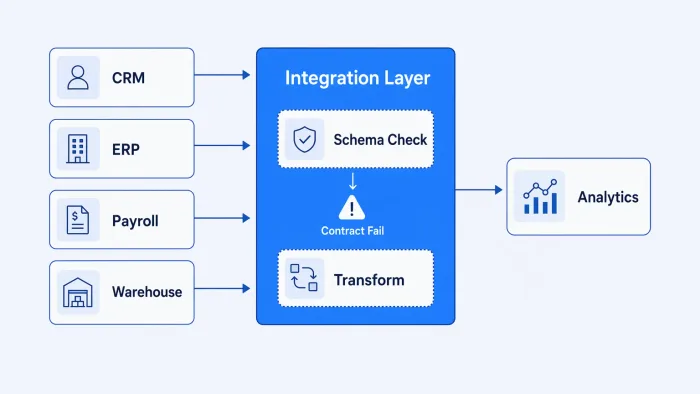
Your BI tool is connected to your CRM. Your data warehouse is getting a feed from your billing system. Your product analytics is pulling session data. Most of that works most of the time. But somewhere in your stack there's also a Slack alert that fires when a customer's provisioning workflow fails — and when it fires, three different engineers have to pull up three different consoles to trace what actually happened across systems that technically "talk to each other."
That second thing is also cloud data integration — a specific case of what data integration actually requires once it's load-bearing, not just a warehouse-feeding pipeline. It just doesn't get discussed in the same breath as your ETL pipeline, and the oversight is where most production problems live.
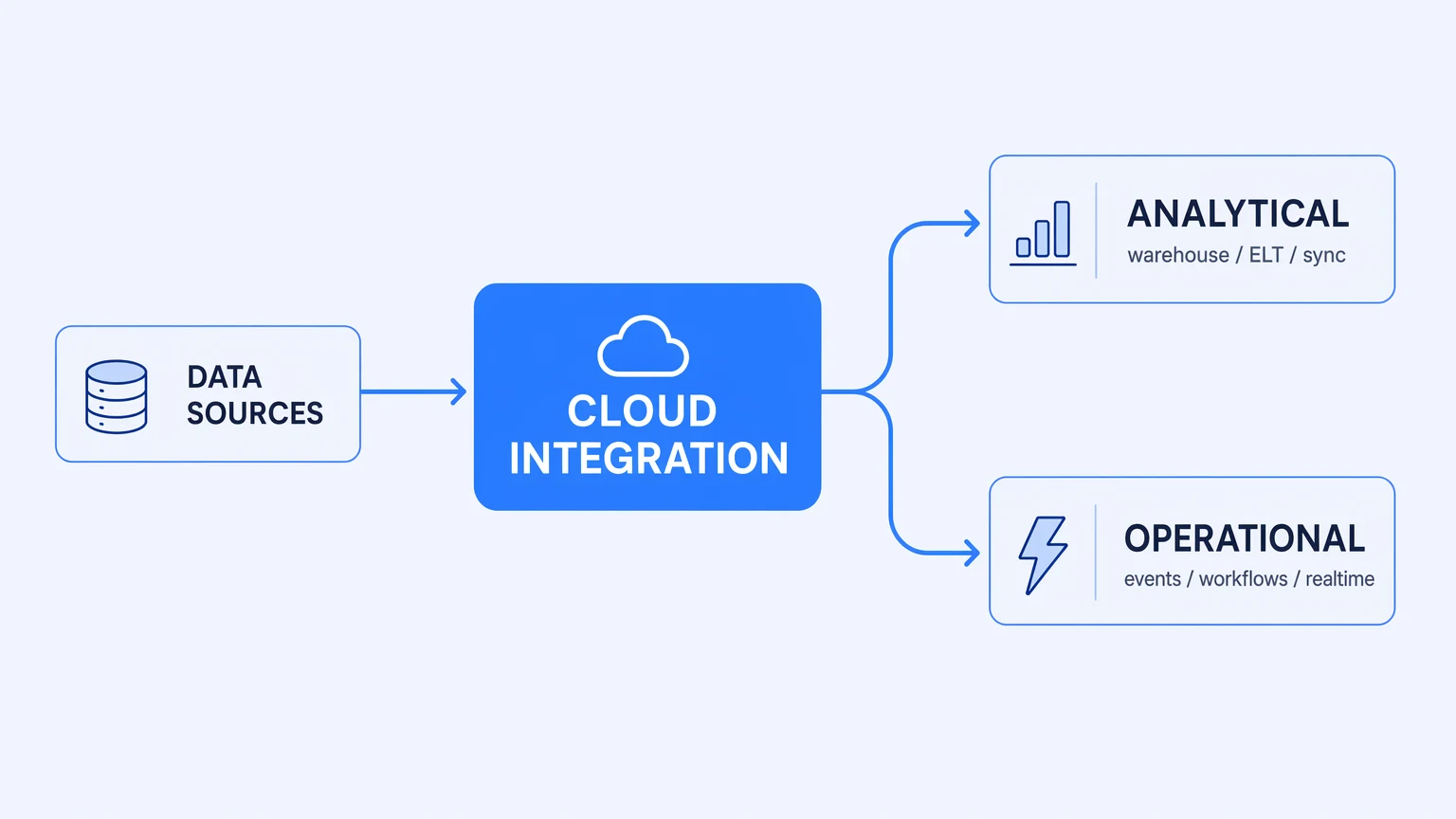
Cloud data integration splits into two very different problems that most guides conflate into one — and getting them confused is expensive.
Two problems wearing the same name
The majority of "cloud data integration" content is about one specific problem: getting data into a centralized repository — a data warehouse, a lakehouse, a data lake — so analysts and ML pipelines can work with it. Connectors from your SaaS applications, ELT transforms inside the warehouse, scheduled syncs. This is a real engineering problem with a reasonably mature tooling landscape. The hard parts are schema drift, CDC setup, and keeping incremental loads idempotent.
That's not what this post is about, because your team already knows that problem exists, and the tooling for it is relatively well-understood.
The problem that fewer guides address is operational integration: the real-time exchange of data and events between systems that actually runs your business processes. Customer provisioning triggered by a subscription event. Invoice generation from time-tracking data. HR system changes propagating to your identity provider. Webhook events from a payment processor routing to order fulfillment. These integrations don't populate a warehouse — they do work, on a schedule or in response to events, with consequences if they fail or behave incorrectly.
Analytically-oriented cloud integration and operationally-oriented cloud integration share a name and some surface-level tooling categories. Beneath that, they're different disciplines with different failure modes, different cost behaviors, and different debugging requirements. An engineer who's solved one hasn't necessarily thought through the other.
The "cloud" in cloud data integration changes the failure modes more than it changes the architecture.
What "cloud" actually changes
The textbook definition of cloud data integration usually stops at the delivery mechanism: integrations run on managed infrastructure you don't have to provision or maintain. That's accurate, but it skips the part that matters operationally.
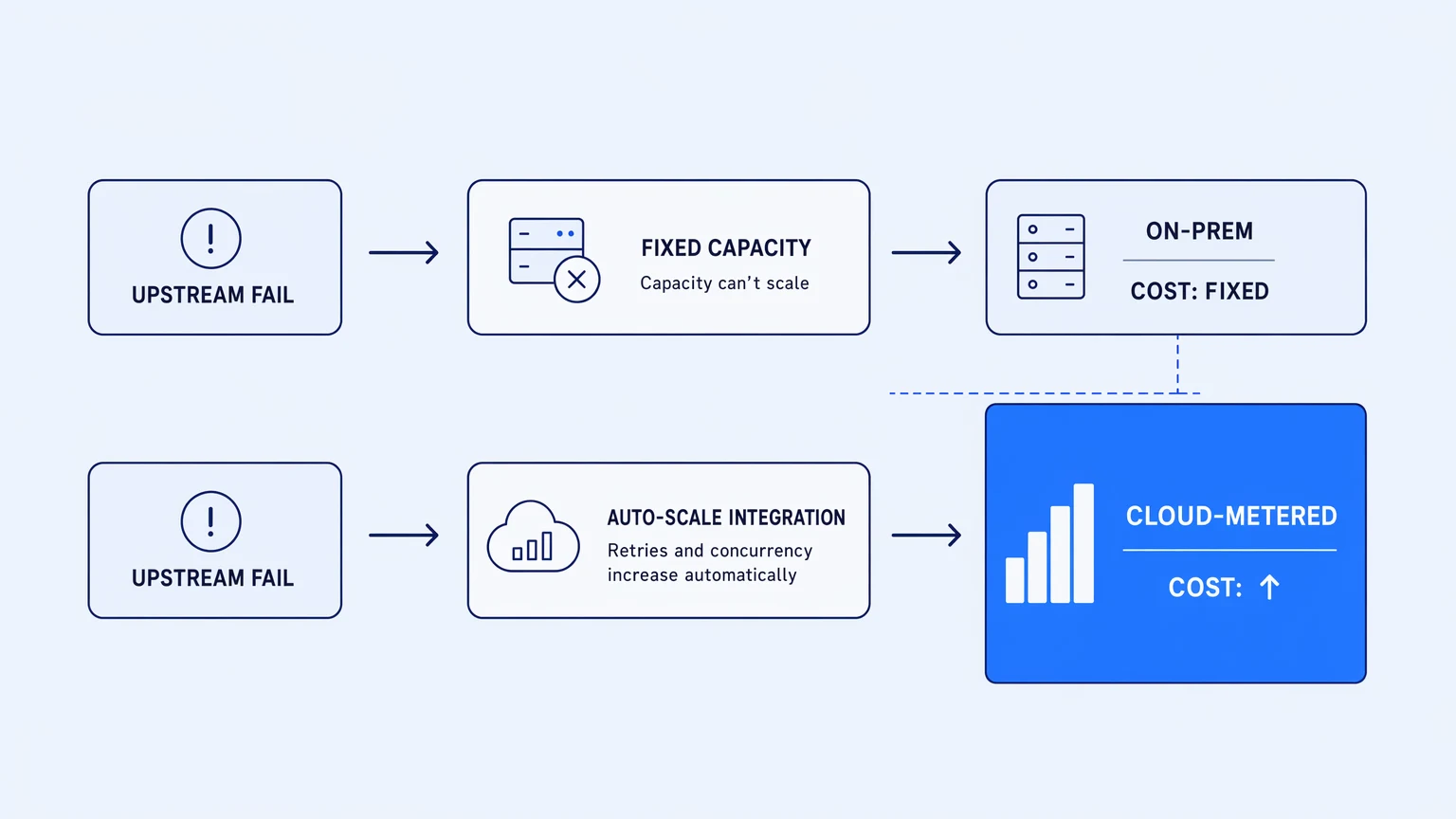
Cloud infrastructure is elastic. It expands to handle load — and so does your bill, if your integration platform meters by execution volume. That coupling is the thing most discussions omit entirely.
On-premise integration middleware ran on hardware you owned. The cost of a retry storm was engineering time and some CPU. A cloud-hosted, usage-metered integration platform changes the equation: the retry storm is also a billing event. A payment processor starts returning intermittent 5xx errors. The integration retries with exponential backoff — as it should. Each retry is an execution. Each execution runs the meter. Your platform is behaving correctly and your invoice for the week doubles. Finance notices before the platform team does, because Finance gets the invoice.
This isn't a theoretical concern. It's the most common billing complaint in mid-market engineering teams running cloud integrations, and it's structural. Usage-metered pricing couples your cost to the behavior of systems you don't control: upstream API reliability, partner webhook volume, event fanout from operational data. The elasticity of the cloud makes the blast radius larger, not smaller.
On-prem integration had fixed costs. Cloud integration has variable costs by default — and the variables are controlled by your partners, not by you.
The second thing "cloud" changes is observability. When integrations run on managed infrastructure, the execution data lives in the vendor's environment. You get a UI. You get logs, if the platform has them. What you often don't get is a trace format compatible with the observability stack your team already uses — the one where your application traces, infrastructure metrics, and on-call runbooks actually live.
This matters more than it seems at first. When a customer reports a provisioning failure, the investigation crosses layers: the web application, the integration platform, the downstream SaaS system. Each layer is observable separately. Connecting them across systems requires either a single observability stack that all layers write to, or a manual investigation that stitches events together from different UIs. Most teams do the latter, not because it's better, but because the integration platform doesn't emit traces in a format the rest of the stack can consume.
Cloud data integration and your application observability are one incident domain; most cloud integration tools treat them as two.
The governance gap that cloud makes visible
Operational integrations run with real credentials and real consequences. An integration that processes payroll data, modifies customer records, or initiates financial transactions is not a passive data movement job. It's a business process with compliance implications.
This was easier to ignore when integration ran on dedicated on-prem middleware. Governance was physical: the server was in your data center, access was through your VPN, audit happened through your network logs. Cloud integration blows that perimeter open in both directions. Your integration platform is calling third-party APIs with service account credentials. Webhook receivers are internet-accessible. Data in transit moves through managed infrastructure you don't own.
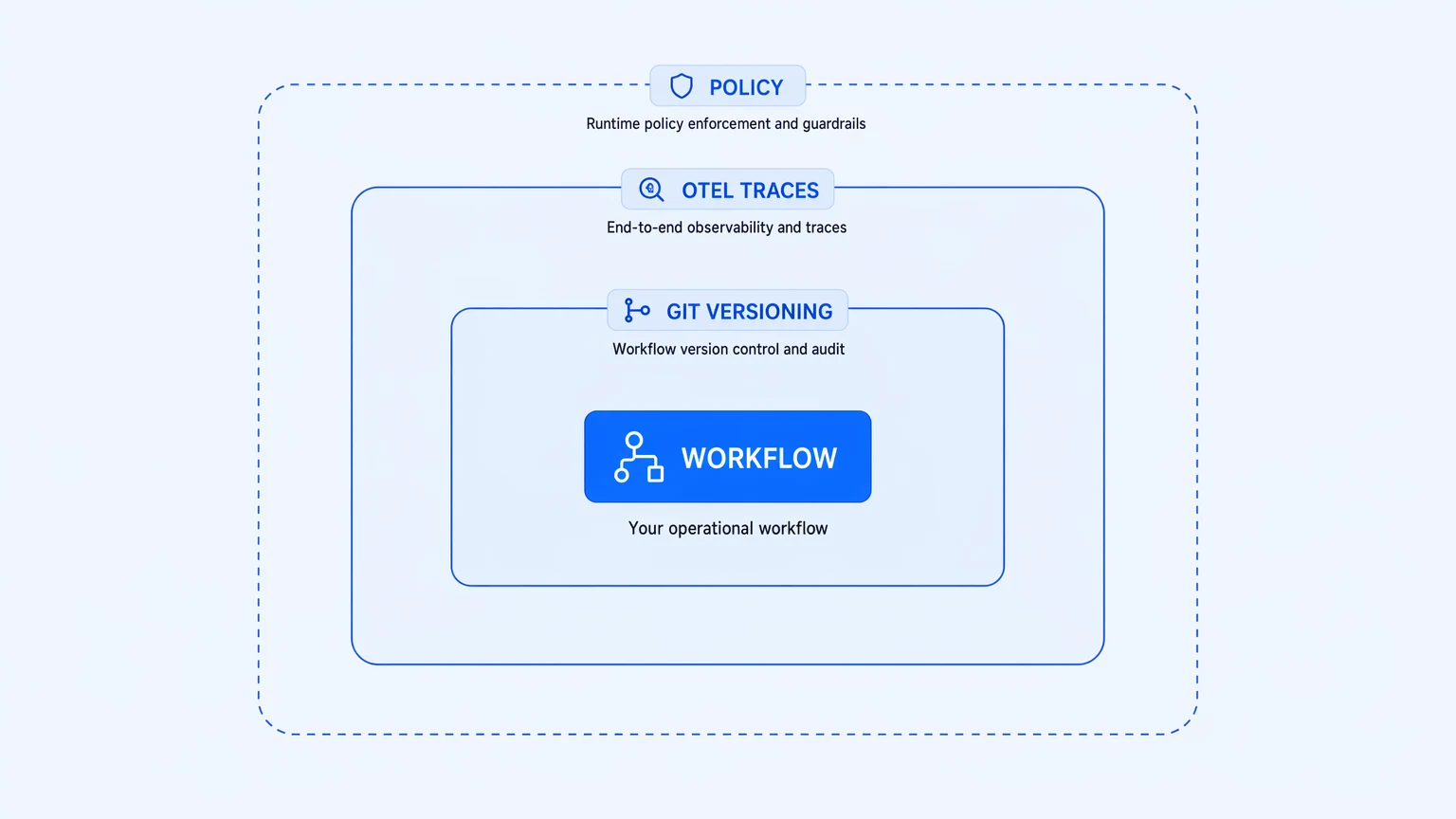
The governance requirements haven't changed — who changed this logic, when, how do we know it ran correctly, what data touched which system — but the tools for meeting them have to work differently in a cloud model. Version control becomes the audit trail for what the logic does. OpenTelemetry traces become the audit trail for when and how it ran. Policy enforcement needs to travel with the workflow, not rely on the perimeter it used to sit behind.
Most operational cloud integration platforms make this hard. Policy is configured separately from the workflow. Audit logs are in the platform's own system, not in your SIEM. The workflow logic itself lives in the vendor's database, not in your repo. When an auditor asks "show me every change to this workflow in the last six months," the answer requires vendor cooperation and platform-specific tooling.
The alternative — workflows as versioned artifacts in your own Git repository, traces emitted in OpenTelemetry format to your existing observability stack, policy expressions evaluated at runtime against attribute tags — is architecturally coherent with how you already govern the rest of your production systems. The integration layer gets the same audit posture as your application code, not a lower one.
For the longer argument about what integration ownership actually requires — code, observability, and cost predictability as a unified posture — the thesis lives in why unobservable integration stacks are the real hidden bill.
What to actually evaluate
When someone asks "what cloud data integration tool should we use," the answer depends entirely on which of the two problems they're solving. If it's analytic integration — warehouse connectors, ELT pipelines, scheduled syncs — the evaluation criteria are connector coverage, sync reliability, and ELT ergonomics. Different market, different tools, different tradeoffs.
If it's operational integration — real-time event processing, SaaS-to-SaaS workflows, business-process automation running in response to events — the evaluation has three questions that most vendor demos don't answer:
How does the bill behave when traffic is abnormal? Specifically: do retries count? Do failed executions count? What happens when an upstream system misbehaves for a week? A platform with no per-execution billing and no overage invoices will give you a straight answer. A platform that meters by task or operation will hedge. The honest answer to this question tells you more about the platform's actual pricing architecture than any pricing page does.
Where does the execution trace go? If the integration fails during a customer provisioning event that also involves your application layer and a downstream SaaS, can your on-call engineer see the full trace in one place, or are they tabbing between your observability platform and the integration vendor's UI? OpenTelemetry support — real OTLP emission to your collector, not a UI-only log viewer — is the line between "one incident" and "two parallel investigations."
Where does the workflow logic live? Is it a versioned artifact in your Git repository, or does it live in the vendor's database? This is the exit question and the audit question simultaneously. If the logic is in the vendor's database, your version history, your review process, and your rollback path all depend on that vendor. Real Git versioning means your workflows are in your repo, branched in-platform, with PRs through your existing GitHub or GitLab flow.
These questions don't appear on the feature checklist that circulates in most evaluations. They appear in the first incident review, in the first compliance audit, and in the conversation with the CFO after the first bill shock.
Koodisi was built around all three: no per-execution billing, no overage invoices; OpenTelemetry on every tier from the free Community plan; real Git versioning with in-platform branching. If you're evaluating operational cloud integration platforms, the Community tier is free and doesn't require a credit card — it's worth a workflow before the spreadsheet.